Frappe
Cloud
Marketplace
Frappe
Products
Insights

Installation Guide
installs
Publisher
Supported versions
Categories
E-Commerce
Resources
About
eKYC India
Frappe app for identity verification and e-signing integrations in India
Digio Integration
Digio is an Indian regulatory-compliant platform for Aadhaar-based identity verification (eKYC) and electronic signatures (eSign).
This app handles the complete two-way integration:
- Frappe → Digio — sends eKYC or eSign requests
- Digio → Frappe — receives webhook events and updates the request status automatically
The integration works with any Frappe DocType — not just Loan Applications.
Digio Documentation
| TopicLink | |
| Environments (Sandbox / Production) | https://documentation.digio.in/digienvironments/ |
| eSign Webhook Events | https://documentation.digio.in/digisign/api_integration/webhooks/#webhook-events-for-digi-sign |
| eKYC Webhooks | https://documentation.digio.in/digistudio/integration/webhooks/ |
| Webhooks General Reference | https://documentation.digio.in/webhooks/ |
Setup
- Go to Digio Settings in the Frappe desk to configure the integration.
General Settings - Request Expiry In Days: How many days before an unanswered request expires on the Digio side. - Generate Access Token: Returns a one-time token in the response (needed for Web SDK flows). - Send Sign Link: Digio emails a direct signing link to the customer. - Notify Customers: Digio sends email/SMS updates to the customer at each status change.
Environment — Sandbox / Production
Digio provides two environments. Use Sandbox for testing and Production for live transactions. Only one can be active at a time.
For each environment, fill in the URL and the API Client ID / Secret obtained from the Digio dashboard.
Sandbox credentials must be requested directly from the Digio team.

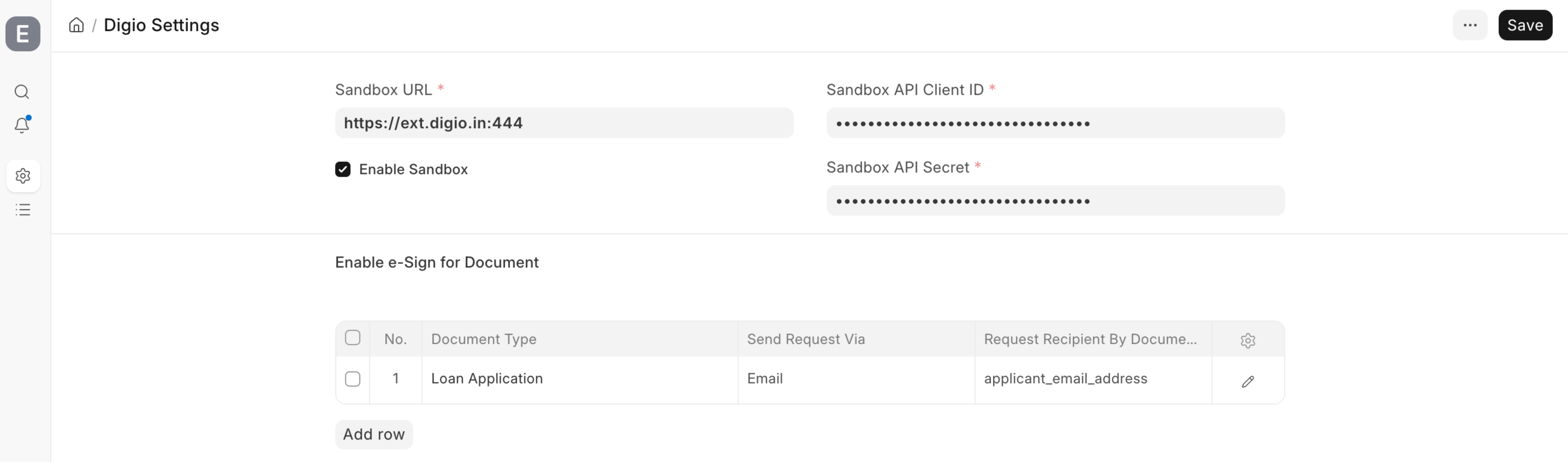
Enable e-Sign for Document - Document Type: The Frappe DocType to enable (e.g. Loan Application). - Send Request: How the request is delivered to the customer — Email or Mobile. - Request Recipient By Document Field: The field on the document that holds the customer's email or mobile number. The dropdown auto-fills with eligible fields from the selected DocType.
Example — Loan Application sent via email to the applicant:

eKYC & eSign Flows
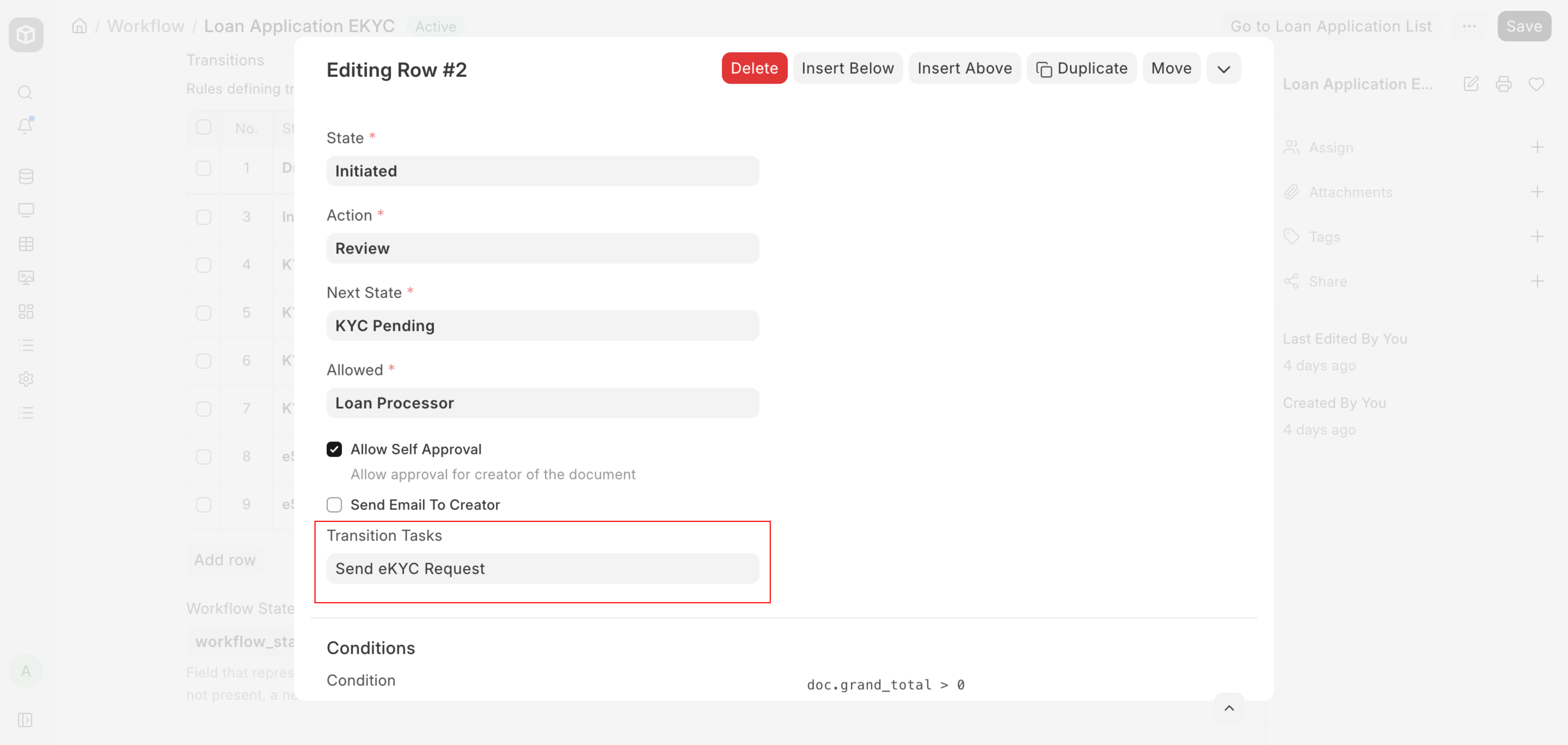
Setting up the Workflow 1. Create a Workflow for your DocType (e.g., Loan Application) from the Desk. 2. When adding a Transition, choose the appropriate action from the dropdown: - Send eKYC Request — for identity verification - Make eSignature Request — for electronic signing
Both actions are pre-created when the app is installed.

How each flow works
eKYC Flow: - A workflow action triggers an eKYC request - Frappe sends the request to Digio using the Aadhaar / PAN / DigiLocker template - Customer receives an email/SMS with a verification link - Customer completes verification on Digio-hosted page
eSign Flow: - A workflow action triggers an eSign request - Frappe generates a PDF of the document and sends it to Digio with signer details - Customer receives an email with a signing link - Customer completes Aadhaar-based electronic signing.
Webhooks
Digio sends status updates to Frappe automatically after each customer action. The webhook URL to register in the Digio dashboard is:
https://<your-frappe-site>/api/method/ekyc_india.ekyc_india.doctype.digio_settings.digio_settings.handle_webhook
Please follow the steps of Webhooks General Reference

Digio Request Log
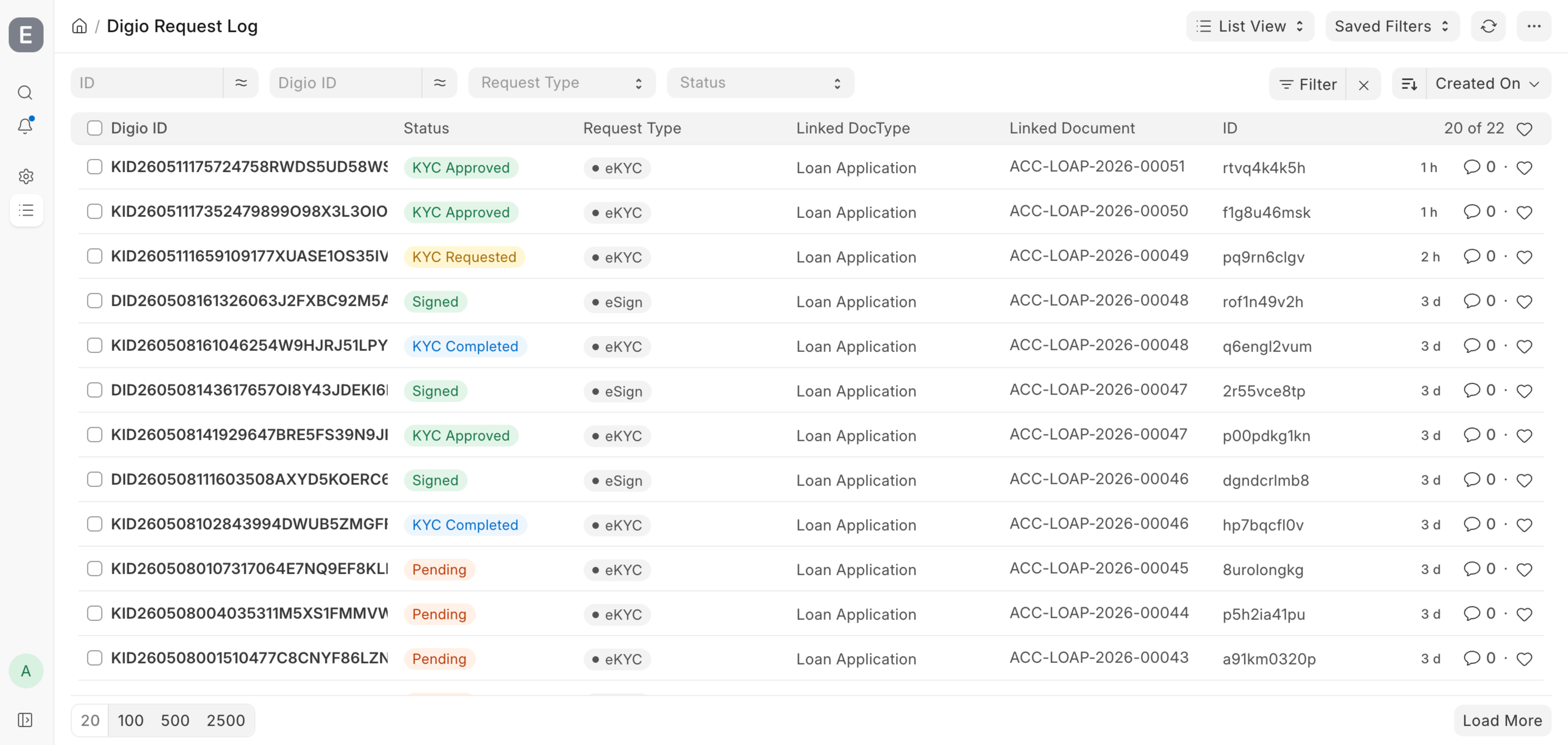
Every request sent to Digio and every webhook received is logged in Digio Request Log. Each log entry shows:
- The Digio request ID
- Whether it is an eSign or eKYC request
- The current status
- Which Frappe document it is linked to
- The full response from Digio and the latest webhook payload

User Reviews
No reviews yet, be the first to review.
0.0
0 rating
More apps from






Explore more apps