Frappe
Cloud
Marketplace
Frappe
Products
Insights

Installation Guide
installs
Publisher
Supported versions
Categories
E-Commerce
About
A generic, reusable Frappe app for One-Time Password (OTP) generation and verification. Supports Email and SMS delivery methods with flexible configuration.
Features
✅ Generic & Reusable: Works with any Frappe app
✅ Multiple Delivery Methods: Email, SMS, or Both
✅ Flexible OTP Types: Numeric or Mixed (letters + digits)
✅ Configurable Length: 4-10 characters
✅ Automatic Expiration: Scheduled job expires OTPs automatically
✅ Email Integration: Uses Frappe's standard
sendmailwith Email Templates✅ SMS Integration: Custom sender functions via configuration
✅ SMS Integration Check: Server-side validation ensures SMS integration method exists before saving
✅ RESTful API: Easy-to-use API endpoints
✅ Security: Uses Python's
secretsmodule for cryptographically secure random generation
Configuration
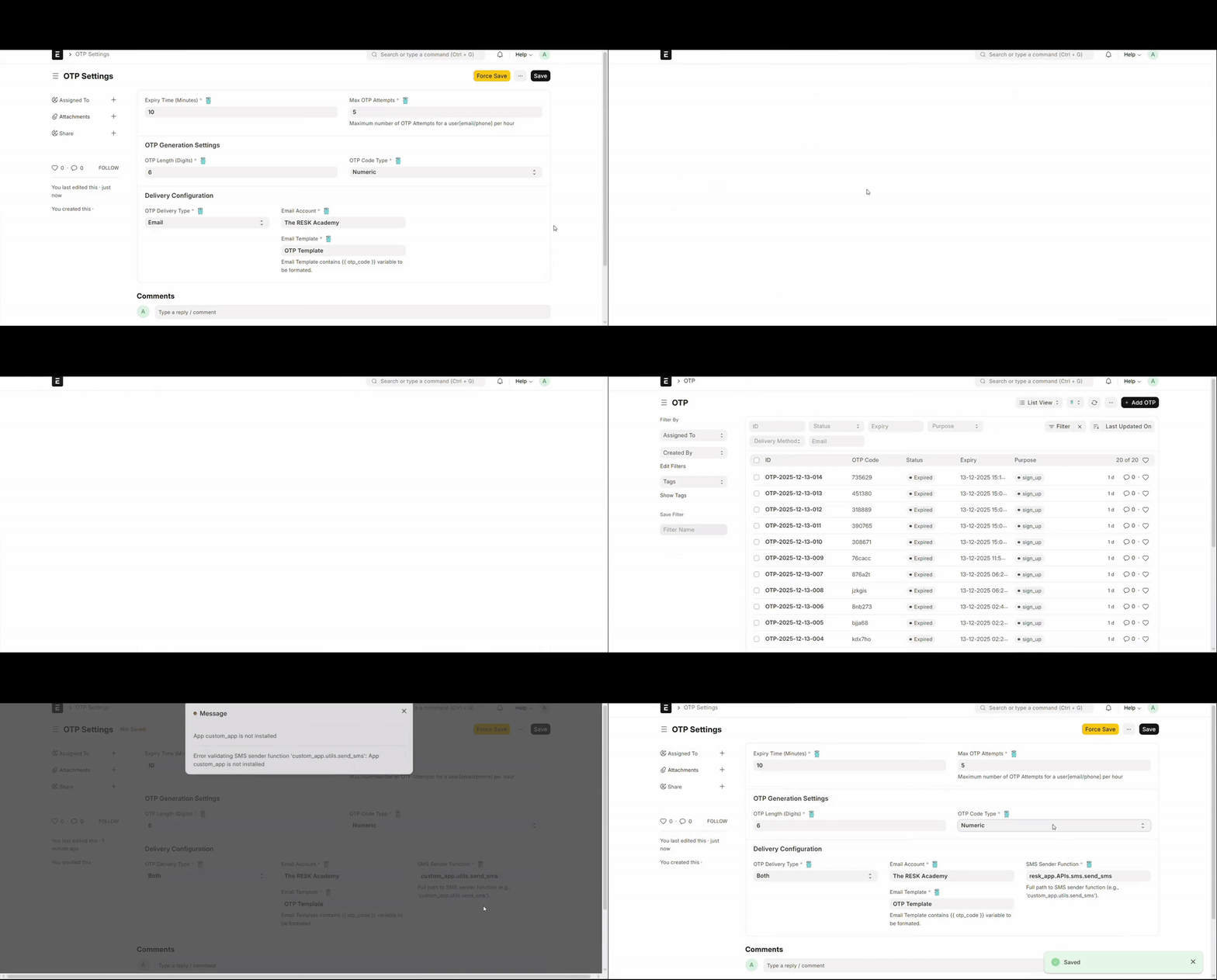
1. OTP Settings
Go to OTP Settings and configure:
Basic Settings
Expiry Time (Minutes): How long OTPs remain valid (default: 10 minutes)
OTP Length: Number of characters (4-10, default: 6)
OTP Code Type:
Numeric: Only digits (0-9)Mixed: Lowercase letters + digits (a-z, 0-9)
Delivery Configuration
OTP Delivery Type: Choose one of: - Email: Send via email only - SMS: Send via SMS only
- Both: Send via both email and SMS
For Email Delivery: - Email Account: Select an active outgoing email account - Email Template: Select an Email Template (must include {{ otp_code }} variable)
For SMS Delivery: - SMS Sender Function: Full path to your SMS sender function (e.g., custom_app.utils.send_sms)
2. Email Template Setup
Create an Email Template in Frappe with: - Subject: Can include {{ otp_code }} and other variables - Response: HTML or plain text with {{ otp_code }} variable
Example Email Template:
Subject: Your OTP Code is {{ otp_code }}

Message:
Your OTP code is: {{ otp_code }}
This code will expire in {{ expiry_time_minutes }} minutes.
3. SMS Sender Function
Create a function in your app to send SMS:
Example in custom_app/utils.py:
def send_sms(otp_code, phone, **kwargs):
    """
    Send SMS via your SMS gateway

    Args:
        otp_code: The OTP code to send (required)
        phone: Phone number (required)
        **kwargs: Additional arguments you can pass (e.g., purpose, user, etc.)

    Returns:
        dict: Result from SMS gateway
    """
    # Your SMS gateway logic here
    # Example: Call Twilio, AWS SNS, etc.

    # You can access additional kwargs if needed
    purpose = kwargs.get("purpose", "verification")

    import requests
    response = requests.post(
        "https://your-sms-gateway.com/send",
        data={
            "phone": phone,
            "message": f"Your OTP code for {purpose} is: {otp_code}"
        }
    )

    return {"success": True, "message_id": response.json().get("id")}
Note: Your SMS sender function must accept otp_code and phone as the first two arguments. Any additional arguments passed to send_otp() will be forwarded via **kwargs.
Then set SMS Sender Function in OTP Settings to: custom_app.utils.send_sms
Usage
REST API
Generate OTP
POST /api/method/otp_generation.api.send_otp
Content-Type: application/json

{
    "email": "[email protected]",
    "purpose": "sign_up"
}
Response:
{
    "message": "OTP generated successfully",
    "http_status_code": 200
}
Validate OTP
POST /api/method/otp_generation.api.validate_otp
Content-Type: application/json

{
    "otp_code": "123456",
    "email": "[email protected]",
    "purpose": "sign_up"
}
Response:
{
    "message": "OTP verified successfully",
    "http_status_code": 200
}
React/JavaScript Client-side
Generate OTP
// Generate and send OTP
frappe.call({
    method: "otp_generation.api.send_otp",
    args: {
        email: "[email protected]",
        purpose: "sign_up"
    },
    callback: function(r) {
        if (r.message) {
            console.log("OTP sent successfully");
        }
    }
});
Validate OTP in Your APIs
You can call validate_otp inside your custom APIs (like signup, resetpassword, etc.):
Example in custom_app/api/auth/sign_up.py:
import frappe
from frappe import _
from otp_generation.api import validate_otp
@frappe.whitelist(allow_guest=True)
def sign_up(email, password, otp_code):
    # Validate OTP first
    try:
        validate_otp(
            otp_code=otp_code,
            email=email,
            purpose="sign_up"
        )
        # If we reach here, OTP is valid (result = {"valid": True})
    except Exception as e:
        frappe.throw(_("Invalid or expired OTP"))

    # OTP is valid, proceed with sign up
    user = frappe.get_doc({
        "doctype": "User",
        "email": email,
        # ... other fields
    })
    user.insert()

    return {"success": True, "message": "User created successfully"}
Example in React:
// Step 1: Send OTP
frappe.call({
    method: "otp_generation.api.send_otp",
    args: {
        email: email,
        purpose: "sign_up"
    },
    callback: function(r) {
        if (r.message) {
            // Show OTP input form
        }
    }
});

// Step 2: Submit sign up with OTP
frappe.call({
    method: "custom_app.api.auth.sign_up",
    args: {
        email: email,
        password: password,
        otp_code: otpCode
    },
    callback: function(r) {
        if (r.message) {
            // Sign up successful
        }
    }
});
Scheduled Tasks
The app includes a scheduled job that runs every 10 minutes to automatically expire OTPs that have passed their expiry time. This is configured in hooks.py:
scheduler_events = {
    "cron": {
        "*/10 * * * *": [
            "otp_generation.tasks.expire_otps"
        ]
    }
}
DocTypes
OTP
Stores individual OTP records with: - otp_code: The generated OTP code - status: Valid or Expired - expiry: Expiration datetime - purpose: Purpose of OTP (signup, resetpassword, etc.) - delivery_method: Email, SMS, or Both - email: Email address - phone: Phone number - user: Link to User (optional)
OTP Settings
Single DocType for system-wide configuration.
Security Considerations
Uses Python's
secretsmodule for cryptographically secure random generationOTPs automatically expire based on configured time
OTPs are marked as expired after verification (one-time use)
Scheduled job cleans up expired OTPs
Guest users can generate/verify OTPs (for sign-up flows)
License
MIT
User Reviews
No reviews yet, be the first to review.
0.0
0 rating
Explore more apps