Frappe
Cloud
Marketplace
Frappe
Products
Insights
Installation Guide
installs
Publisher
Supported versions
Categories
E-Commerce
About
🌐 PWA Frappe
A Progressive Web App (PWA) implementation for the Frappe Framework, enabling your applications to be installed and run as native-like apps on both desktop and mobile devices. 🚀
✨ Features
⚡ Progressive Web App Support — Turn your Frappe site into an installable PWA
📱 Cross-Platform Installation — Works on iOS, Android, and Chrome Desktop
🔔 FCM Push Notifications — Firebase Cloud Messaging for desk
Notification Logalerts (mentions, assignments, shares, energy points)💾 Offline-First Architecture — Smart caching via Service Worker
🎨 Customizable Manifest — Icons, colors, display modes & screenshots
🧩 Easy Configuration — Manage everything from simple Frappe DocTypes
⚙️ Configuration
1️⃣ Web App Manifest Setup
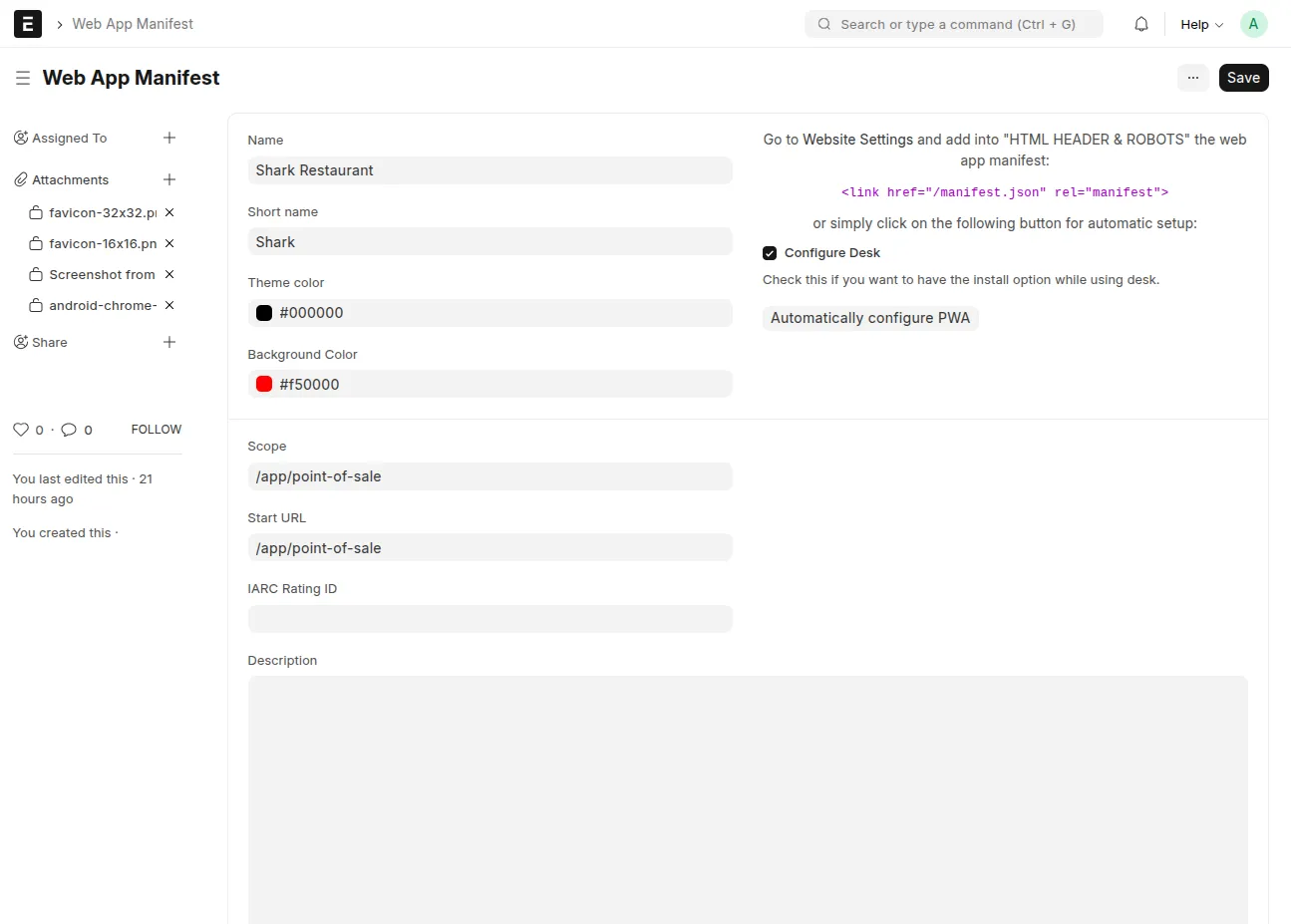
Go to Web App Manifest in your Frappe Desk and configure:
🏷️ App Name — Full name of your app
🔤 Short Name — Short display name
🎨 Theme & Background Colors
🧭 Display Mode —
fullscreen,standalone,minimal-ui, orbrowser🖼️ Icons — Upload in multiple sizes (192x192, 512x512 recommended)
📸 Screenshots & Categories — For app store appearance
2️⃣ Auto PWA Configuration
Click "Automatically configure PWA" to:
✅ Add manifest link to Website Settings
✅ Enable PWA features automatically
✅ Optionally enable Desk Mode support
3️⃣ Service Worker Setup (Optional)
Visit Service Worker doctype to:
🔑 Generate VAPID keys for classic Web Push
⚙️ Configure caching and update policies
4️⃣ FCM Push Notifications
Every logged-in desk user gets a browser push notification whenever a Notification Log entry is created for them (mentions, assignments, shares, energy points, alerts) — no changes needed on the Frappe/ERPNext side, this hooks into the core Notification Log doctype. Nothing for end users to click or configure: it enables itself silently on their next desk login, once an admin has set it up (below).
A. Admin setup (one-time, per site)
Log in to your site's Desk as a System Manager (e.g.
Administrator).Create a Firebase project and enable Cloud Messaging.
Under Project Settings → Cloud Messaging → Web configuration, generate a Web Push certificate (VAPID key pair) and copy the public key.
Under Project Settings → General, copy the Web app config (
apiKey,authDomain,projectId,storageBucket,messagingSenderId,appId).Under Project Settings → Service accounts, generate a new private key (downloads a JSON file) — this is used server-side to send messages via the FCM HTTP v1 API.
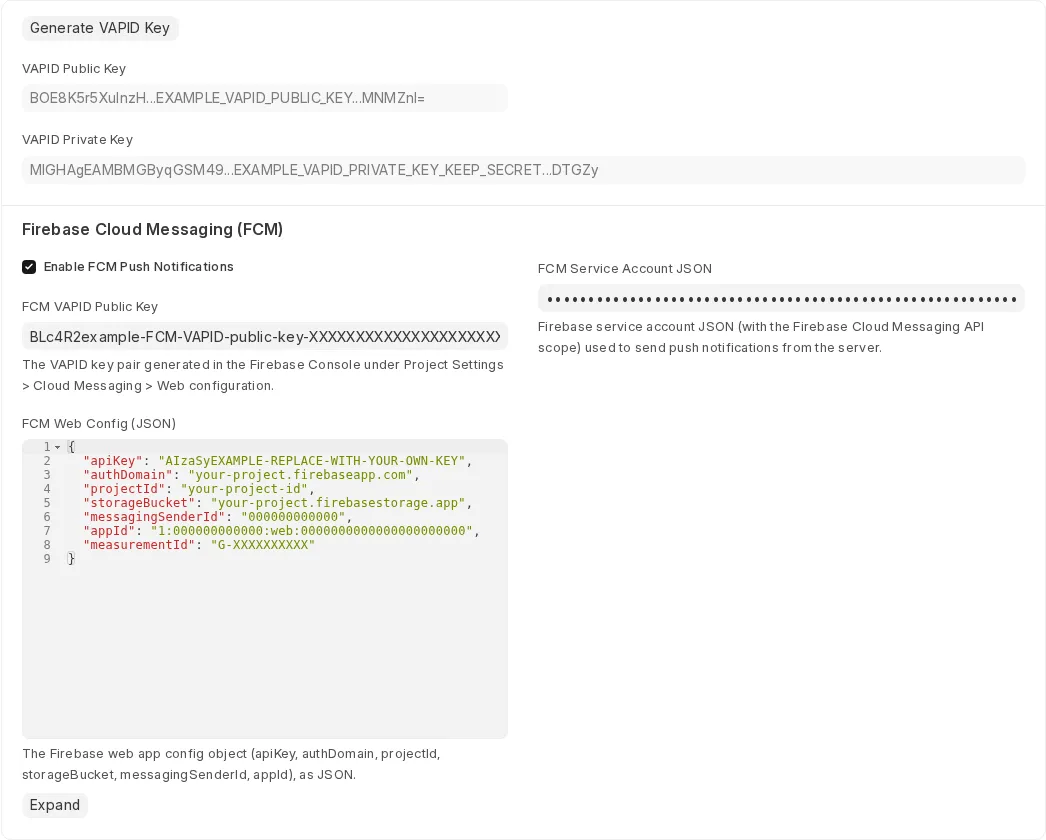
In your Frappe Desk, open the Service Worker doctype and fill in the Firebase Cloud Messaging (FCM) section:
✅ Enable FCM Push Notifications
🔑 FCM VAPID Public Key — from step 3
⚙️ FCM Web Config (JSON) — from step 4
🔒 FCM Service Account JSON — paste the full contents of the file from step 5 (stored encrypted, never shown again in plain text)
Click Save.
That's it — no further admin action needed. Every desk user (including the admin) will pick this up automatically on their next login.
B. What end users see
Nothing to configure. On their next desk load, the browser will silently register for push and — the first time only — show the browser's native "Allow notifications?" permission prompt. Once Allow is clicked, they're subscribed for good; nothing changes for them if they click nothing or dismiss it (they simply won't get push notifications until they allow it, which they can also do later from the browser's own site-permissions UI).
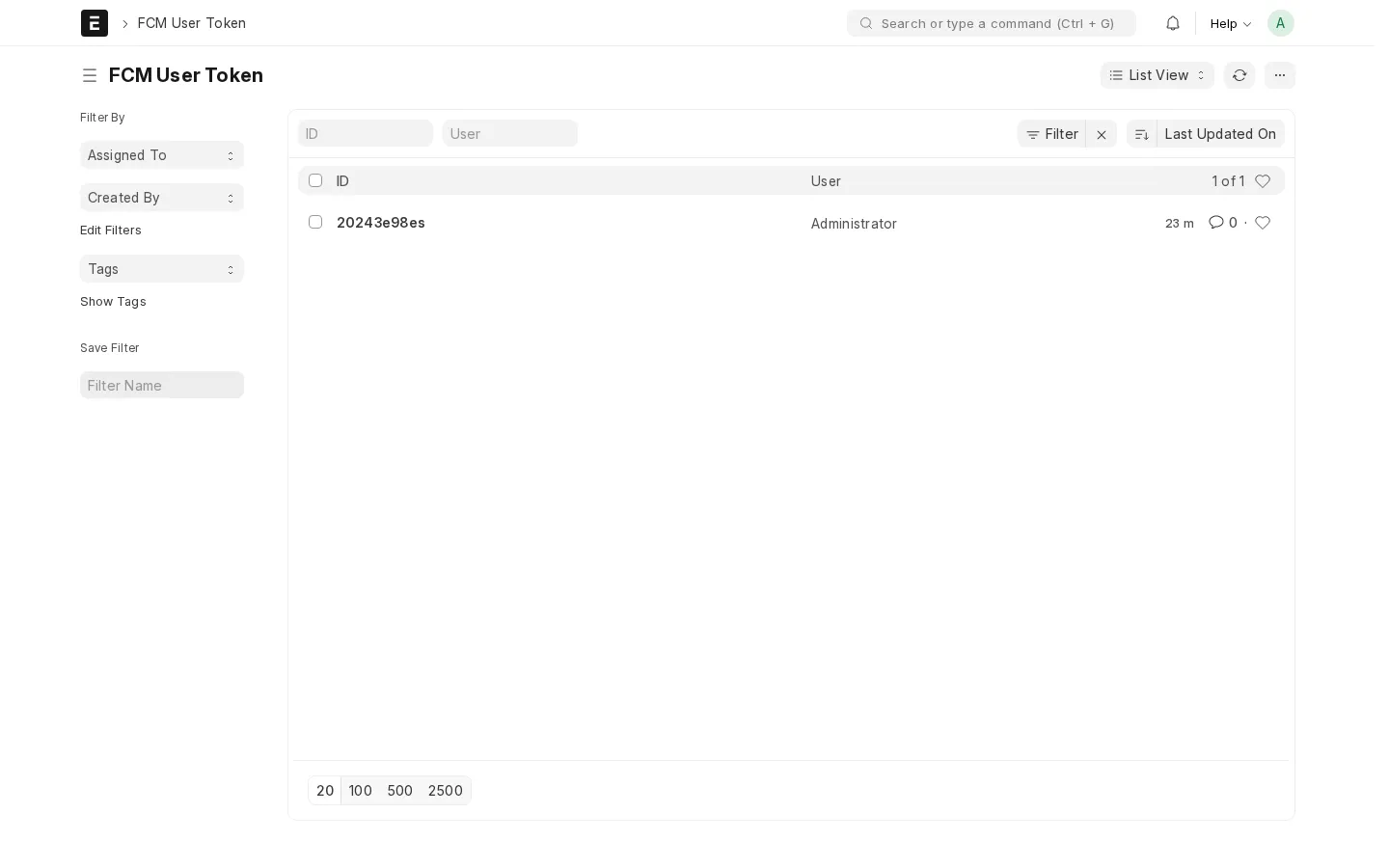
A successful subscription creates a record in FCM User Token, one per user per browser/device:
Tokens FCM reports as unregistered (e.g. browser data cleared, uninstalled) are pruned automatically the next time a push is attempted.
💡 Usage
🖥️ Desktop (Chrome/Edge)
Visit your site
Click the Install icon in the address bar or select Install [App Name]
📱 Android
Open your site in Chrome
Tap Add to Home Screen when prompted
🍎 iOS (Safari)
Open your site in Safari
Tap Share → Add to Home Screen → Add
Visit /install for a full installation guide.
🧱 Technical Details
📁 Directory Structure
pwa_frappe/
├── pwa_frappe/
│   ├── doctype/
│   │   ├── service_worker/           # Service Worker + FCM config
│   │   ├── fcm_user_token/           # Per-user FCM tokens
│   │   └── web_app_manifest/         # Manifest settings
│   ├── fcm.py                        # FCM subscribe/unsubscribe + Notification Log push
│   ├── public/js/
│   │   ├── pwa_frappe.js             # Desk manifest injection
│   │   └── fcm.js                    # Desk FCM registration & foreground messages
│   └── www/
│       ├── app.html                  # PWA-enabled Desk template
│       ├── manifest.json             # Dynamic manifest endpoint
│       ├── sw.js                     # Service Worker script (+ FCM background messages)
│       ├── pwa.js                    # Client-side PWA logic
│       └── install.html              # Installation instructions
🧠 Service Worker Caching
Caches:
Static assets (CSS, JS, images)
Frappe core resources
Custom app assets defined in hooks
Old caches are auto-cleared upon activation 🔁
📄 DocTypes
Web App Manifest — Main configuration
Manifest Icon / Screenshot / Category / Related App — Child tables
Service Worker — Caching & FCM notifications config
FCM User Token — Registered browser push tokens per user
🧹 Code Quality
🐍 Ruff — Python linting
💅 Prettier — Code formatting
🧭 ESLint — JavaScript linting
🌍 Browser Support
✅ Chrome (Desktop & Mobile) ✅ Safari (iOS 11.3+)
⚠️ Limitations
🔔 FCM push notifications currently cover the desk
Notification Logdoctype only (no portal/website push yet)🔒 HTTPS required for PWA features
🍎 Limited iOS PWA support (and no push notifications on iOS Safari)
🧰 Troubleshooting
❌ PWA not installing?
Ensure HTTPS is enabled
Verify
/manifest.jsonis reachableCheck Service Worker registration in DevTools
🔁 Service Worker not updating?
Hard refresh (Ctrl+Shift+R)
Clear site data
Update cache version
🤝 Contributing
Fork this repo
Create a feature branch
Run pre-commit checks
Submit a PR 🧡
📜 License
MIT License — see license.txt
🙌 Credits
Originally developed by Md Omar Faruk Maintained by the Frappe Community
🧭 Support
User Reviews
No reviews yet, be the first to review.
0.0
0 rating
More apps from

Explore more apps