Frappe
Cloud
Marketplace
Frappe
Products
Insights

Installation Guide
installs
Publisher
Supported versions
Categories
E-Commerce
About
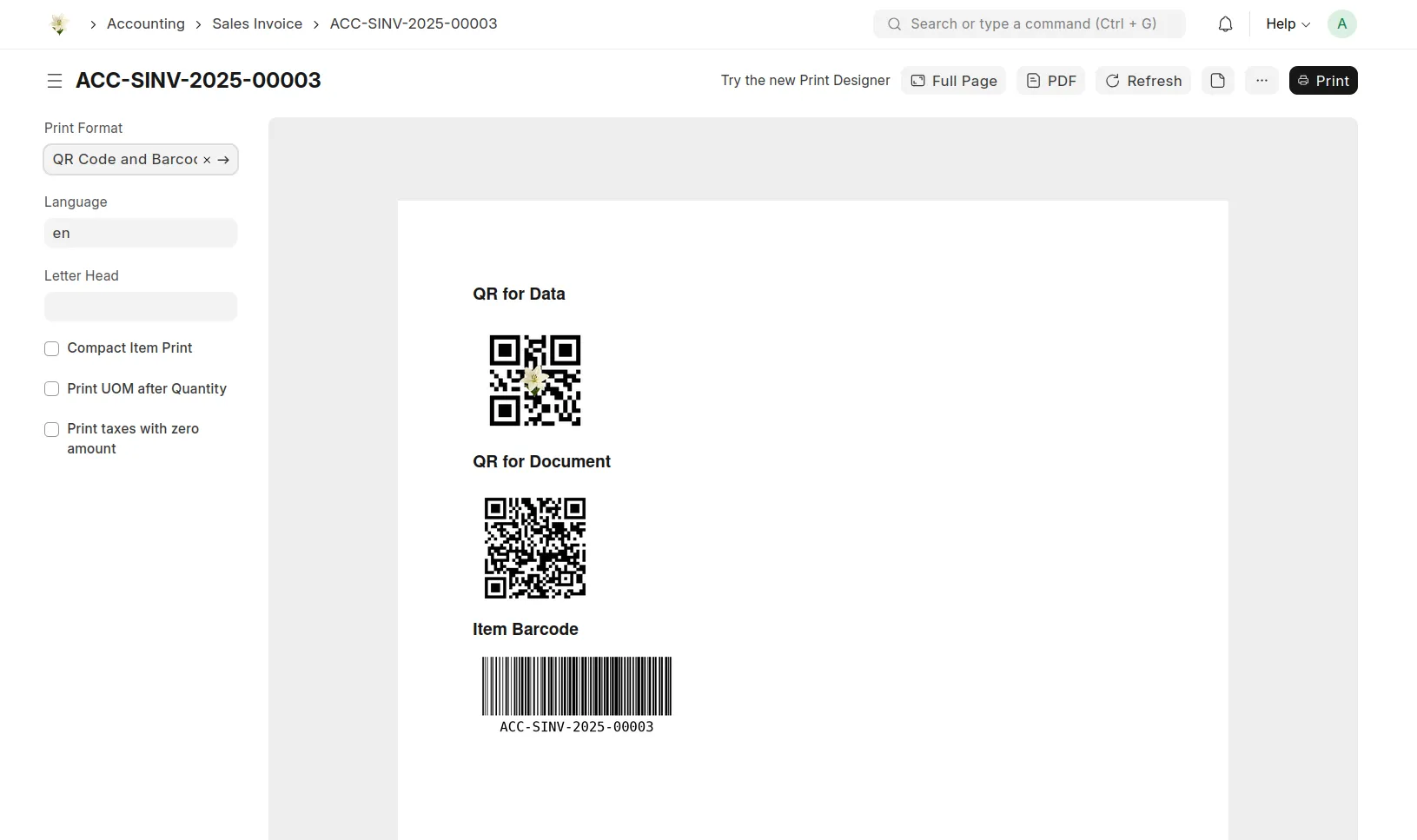
Scan Me is a Frappe utility app that turns any allowlisted document into a verifiable, signable, printable artifact. It combines QR-backed document verification, a Chromium-powered PDF pipeline with live preview, PAdES cryptographic signatures, and a developer-friendly toolkit of Jinja helpers and JavaScript utilities — all driven by a tabbed settings form, with zero boilerplate.
Whether you need a one-line QR helper inside a print format or a full audit-grade signing workflow with tamper detection, Scan Me ships both — out of the box.
✨ Purpose
Scan Me is built to solve the following needs:
Add QR codes and barcodes to print formats without long boilerplate.
Generate per-document Verified QR records with unique IDs, content hashes, and signer metadata.
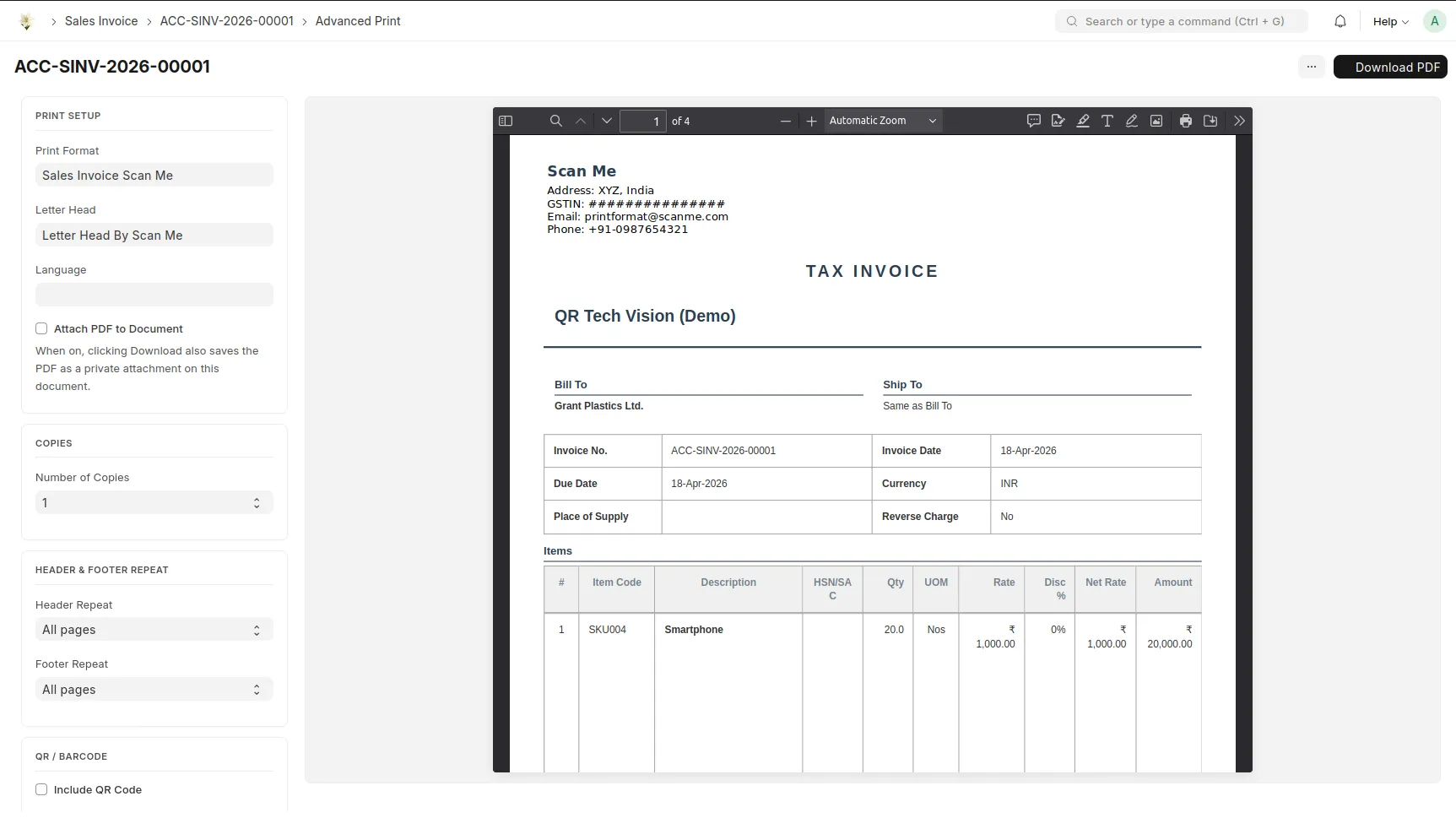
Produce pixel-perfect PDFs from print formats using a modern Chromium engine — flex, grid, web fonts, all supported.
Cryptographically sign PDFs (PAdES) so Adobe Reader recognises the signature panel.
Provide a public, mobile-first verification page where anyone can scan a printed document and instantly confirm authenticity.
Make document verification trivial via embedded scan-friendly QR links.
👥 Who Can Use This App?
Developers
Add a QR code or barcode to any print format with one Jinja call.
Inject QR codes into DocType field descriptions with a single JavaScript helper.
Build verification flows on top of a stable, whitelisted API surface.
Customise PDF output (multi-copy, header/footer modes, watermarks, signature blocks) without forking core code.
End Users
Generate Verified QR records from any allowlisted DocType with a single button click.
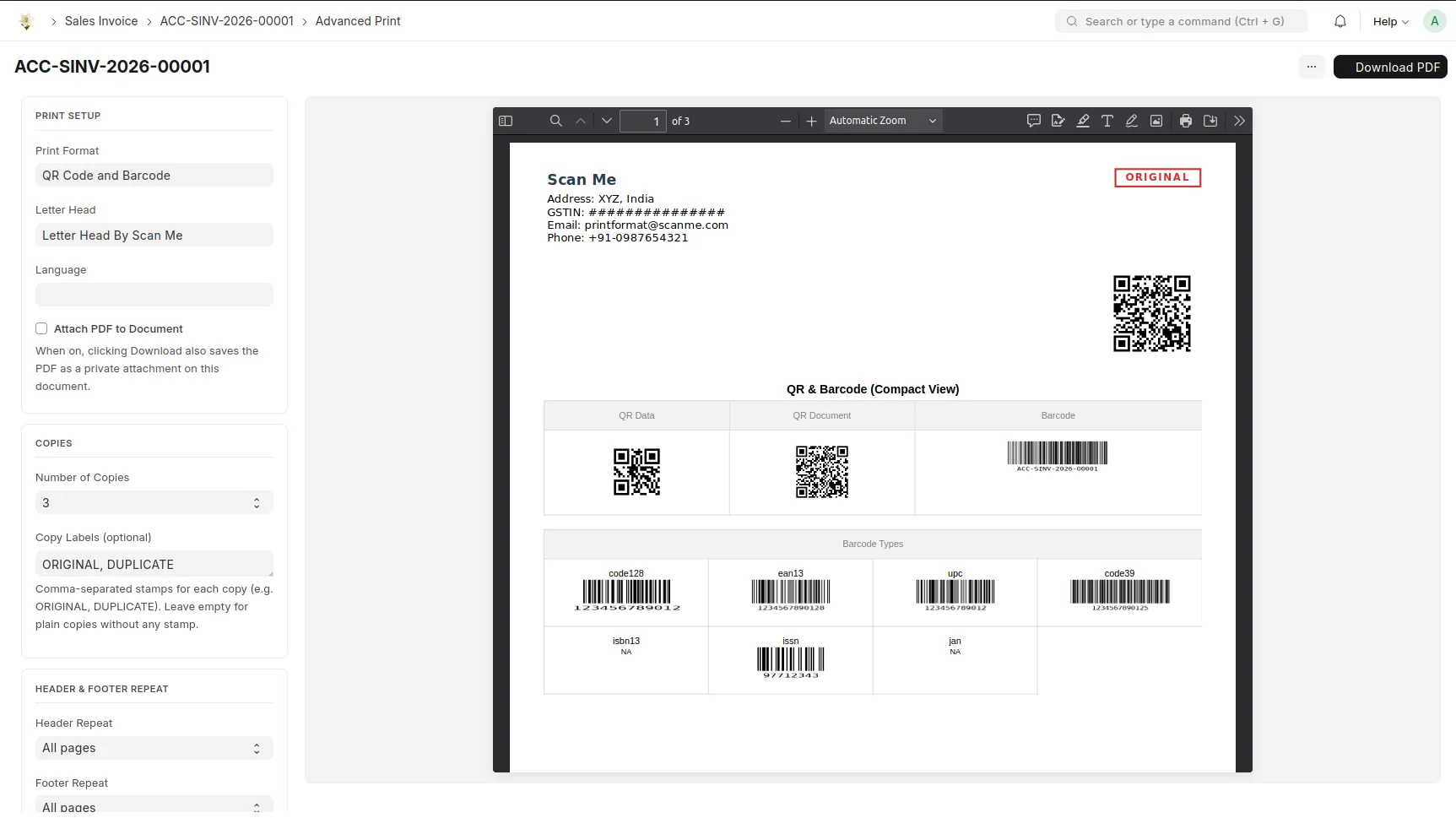
Use the Advanced Print page to preview, configure, and download PDFs in real time.
Scan a QR on any printed document and verify authenticity from a phone.
Administrators
Configure allowed doctypes, signing rules, public-verify detail levels, and dialog features from a single tabbed form.
Lock signature records permanently for audit compliance.
Upgrade self-signed PAdES certificates to CA-issued ones with no code changes.
🧩 Key Features
🔐 Verified QR — Document Signing
One Verified QR record per signature — unique ID, timestamp, content hash, signer identity, signature image.
Multi-signer support — multiple users can sign the same document, each with their own Verified QR.
HMAC-signed QR payloads — tamper detection on the QR code itself.
Optional SHA-256 content hash captured at sign time — edits to the source document automatically invalidate the signature.
Permanent signature lock — signed records can be made immutable, no admin override.
Stored-signature mode — server reads the user's saved signature instead of accepting client-supplied images.
🖨️ Chromium PDF Pipeline
A second, parallel print pipeline based on headless Chromium (via Playwright):
Modern CSS — flex, grid, web fonts, calc(), container queries — all rendered the way browsers render them.
Live PDF preview pane that re-renders on every option change (debounced).
Multi-copy printing (1–5) with custom labels — Original / Duplicate / Triplicate, or any comma-separated list.
Header & footer repeat modes — All pages / First only / Last only / First + Last / None.
QR insertion at any of the four corners with tamper-proof payload.
Acrobat-style signature card with VERIFIED / INVALIDATED state colours.
Watermark system — Document Status (auto DRAFT / CANCELLED / status) or Custom Text.
🧠 PAdES — Cryptographic PDF Signatures
PyHanko-based PDF signing recognised by Adobe Acrobat's signature panel.
Self-signed certificate auto-generated on first use.
Drop-in upgrade path — replace the bundled PFX with a CA-issued certificate to get Adobe's green "Signed and all signatures are valid" badge.
Signature Type selector — Visual Block / Cryptographic / Both.
🌐 Public Verification Page
Mobile-first, dark-mode-aware verify page at
/verify_document/.Camera-based QR scanner with a manual paste fallback.
Three distinct result states — Verified, Signature Invalidated (tampered), Not Recognised.
Admin-configurable detail level — Minimal / Standard / Full — controls how much metadata guests see.
Hard-capped guest exposure — even at the Full tier, unauthenticated users only see the signed-on date.
Rate-limited per IP (30 / 60s) and per UUID (60 / hour) to block harvesting attacks.
HTTPS-only secure cookies, CSRF-aware POST, hardened CSP and referrer policy.
⚙️ Tabbed Settings
A single Scan Me Settings form with four tabs:
Allowed Documents — pick which DocTypes can be signed.
Verification & Signing — multi-signer, content hash, lock, stored signature, PAdES, signature type, watermark mode.
Public Verification — guest detail level.
Print Dialog Features — toggle each section of the Advanced Print page.
🪄 Jinja Helpers
Auto-registered helpers for use in any print format, web page, or email template:
Function | Description |
|---|---|
| Generate a QR code image (base64 data URI). |
| Generate a barcode image (Code128 default). |
| QR encoding the document's desk URL. |
| Pre-built |
| Pre-built |
| QR encoding the Verified QR payload (uuid + HMAC signature). |
| Pre-built |
Example Usage
<img src="{{ qr(doc.name, clearity=10, include_logo=True) }}" width="120">
<img src="{{ barcode(doc.name, 'code128', module_height=25) }}" width="200">
<img src="{{ qr_link('Sales Invoice', doc.name) }}" width="120">
{{ verify_qr_img(doc.doctype, doc.name) }}
🪛 JavaScript Utility
add_qr_to_description(frm, fieldname, value) — auto-embed a QR code inside any field's description area.
frm.fields.forEach(f => {
    if ((f.df.description || "").toLowerCase().includes("qr")) {
        add_qr_to_description(frm, f.df.fieldname, frm.doc[f.df.fieldname]);
    }
});
📄 Bundled Print Formats
Sales Invoice Scan Me — full-featured invoice with QR footer.
SO — sample Sales Order format.
Basic HTML Template by Scan Me — minimal starter; duplicate it to build your own format.
Letter Head By Scan Me — reference letter head shipped as a fixture.
🔒 Security Highlights
HMAC-signed QR payloads — tamper-evident verification.
HMAC-wrapped content hashes — bind to doctype, name, and signer.
Per-UUID and per-IP rate limiting on the public verify endpoint.
Hardened CSP and referrer policy on the verify page.
Permission-aware exposure — guests get the minimum, authenticated users with read permission get the configured tier.
Allowlist-validated paths everywhere file I/O touches the disk.
POST-only public endpoint — blocks cross-origin GET probing via
<img>/<iframe>/<script>/<link>.
⚠️ Known Limitations
Self-signed PAdES certificates show as "signer's identity is unknown" in Adobe until replaced with a CA-issued PFX.
Multi-copy PDF capped at 5 copies.
Signature image upload limited to PNG/JPEG, max 2 MB.
Test suite is currently skeleton-only — full coverage planned for the next minor release.
📅 Roadmap
Camera-based direct QR scanning inside the Desk.
Tabular signature audit dashboard for compliance reviews.
Signature stamps and watermark templates library.
Web Form QR/Barcode widget.
NFC-encoded smart-link support.
Expanded test coverage and CI workflows.
🎯 Summary
Scan Me is a developer-focused, audit-grade utility app that makes QR, barcode, and signed-PDF workflows in Frappe extremely simple. Drop in a Jinja helper for the basics, or unlock the full Advanced Print page, Verified QR records, and PAdES cryptographic signing for a hardened, end-to-end document trust workflow — all configurable from a single tabbed settings form, with zero boilerplate.
User Reviews
5 stars
%
4 stars
%
3 stars
%
2 stars
%
1 star
%
•
Reply
5.0
1 rating
Explore more apps