Frappe
Cloud
Marketplace
Frappe
Products
Insights

Installation Guide
installs
Publisher
Supported versions
Categories
E-Commerce
About
EDocument Integration
Integration app for sending and receiving PEPPOL e-documents via service providers (B2B Router, Recommand).
This app extends the edocument app by providing integration capabilities with PEPPOL service providers for: - Sending e-documents: Transmit PEPPOL invoices and credit notes via API to service providers - Receiving e-documents: Receive incoming documents via webhooks and polling - Automatic processing: Incoming documents are automatically processed and create EDocument records
Installation
This app requires the edocument app to be installed first.
You can install this app using the bench CLI:
cd $PATH_TO_YOUR_BENCH
bench get-app https://github.com/prilk-consulting/edocument_integration --branch $MAJOR_VERSION
bench install-app edocument_integration
Please use a branch (MAJOR_VERSION) that matches the major version of ERPNext you are using. For example, version-14 or version-15. If you are a developer contributing new features, you'll want to use the develop branch instead.
Setup
EDocument Integration Settings
Configure integration with PEPPOL service providers using the EDocument Integration Settings doctype:
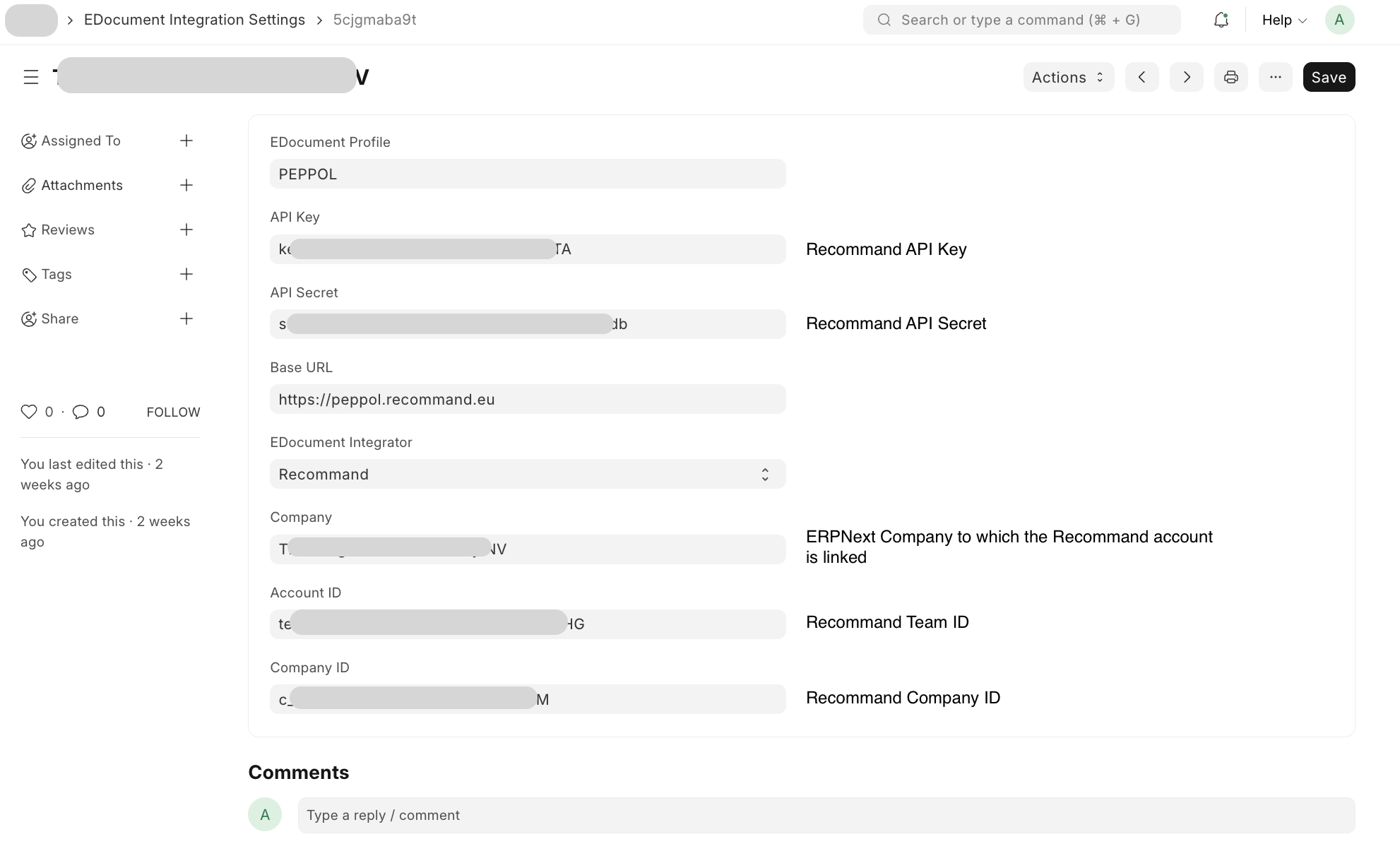
Go to EDocument Integration Settings (available in the EDocument Integration module)
Create a new document
Configure the following:
EDocument Profile: Select "PEPPOL" (or your configured profile)
Company: Select the company for which this integration applies
EDocument Integrator: Choose your service provider:
B2B Router: For B2B Router integration
Recommand: For Recommand integration
API Configuration: Enter your API credentials:
API Key: Your service provider API key
API Secret: Your service provider API secret (for Recommand)
Base URL: Your service provider's API base URL
Account ID: Your account identifier (for B2B Router, also used as team_id for Recommand)
Company ID: Your company identifier (for Recommand)
Recommand Setup
Getting API Credentials
To use Recommand integration, you need to obtain your API credentials from the Recommand dashboard:
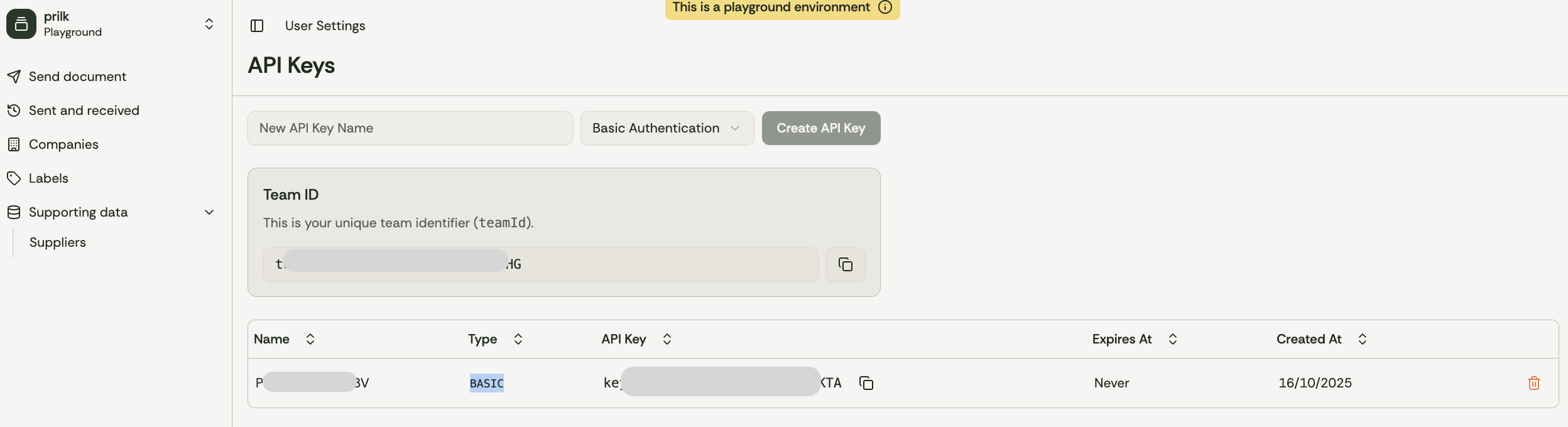
Log in to your Recommand account at https://peppol.recommand.eu
Navigate to Settings → API Keys
Generate or copy your API Key and API Secret
Note your Team ID (Account ID) and Company ID from the settings page
Recommand Settings Configuration
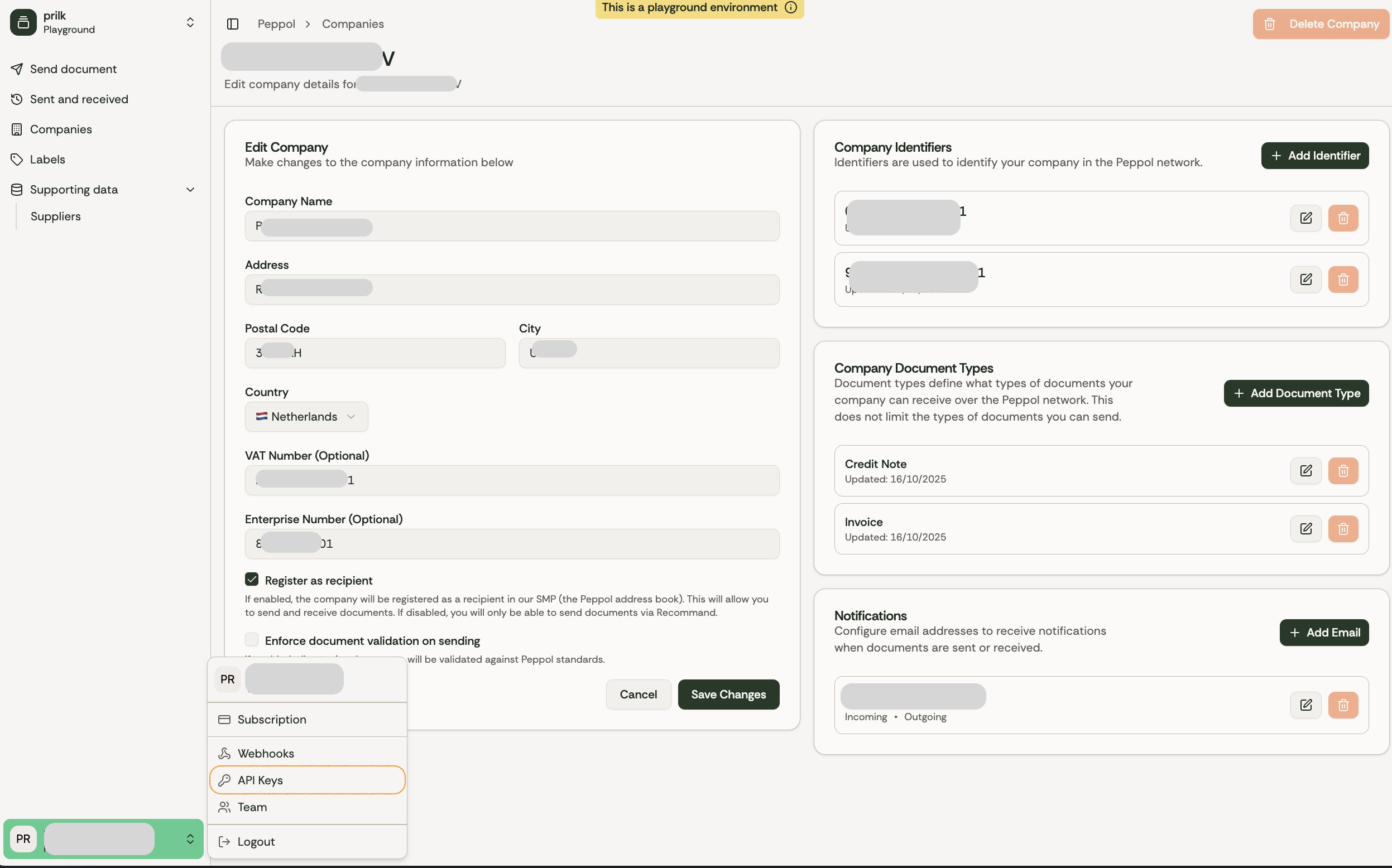
In the Recommand dashboard, you can: - View your Team ID (used as Account ID in integration settings) - View your Company ID - Configure webhook URLs for receiving incoming documents - Monitor document transmission status - Access API documentation
Important: Make sure to copy the exact values from your Recommand dashboard to the EDocument Integration Settings form.
Webhook Configuration
For receiving incoming documents via webhook:
Configure your webhook URL in your service provider's dashboard
The webhook URL format is:
https://your-domain.com/api/method/edocument_integration.api.webhookThe webhook will automatically:
Detect the document profile from XML
Create an EDocument record
Attach the XML file
Validate the XML automatically
Polling Configuration
For receiving incoming documents via polling:
In EDocument Integration Settings, click the "Poll Incoming Documents" button
This will fetch new documents from your service provider's inbox
Each document will be automatically processed and create an EDocument record
The system will automatically detect the profile and validate the XML
Automatic Polling: The app includes a scheduled task that automatically polls for incoming documents every hour. This runs for all active integration settings with Recommand integrator.
Usage
Sending E-Documents
To send a PEPPOL e-document via API:
Create an EDocument record:
Set Source Type (e.g., "Sales Invoice")
Set Source Document (the Sales Invoice name)
Select EDocument Profile (e.g., "PEPPOL")
Click Generate XML to create the PEPPOL XML
The XML is automatically validated
Click Transmit via API button (available when integration settings are configured)
The document will be transmitted to your configured service provider
A success message will display the transmission ID and tracking information
Receiving E-Documents
Incoming documents are automatically processed when received via: - Webhook: Real-time processing when documents are delivered - Polling: Manual or scheduled polling of the inbox
Processed documents create EDocument records that can be: - Validated against XSD and Schematron rules - Parsed to create Purchase Invoice documents in ERPNext - Reviewed before creating ERPNext documents
Creating Purchase Invoices from Incoming Documents
After receiving an incoming document:
Open the EDocument record
Review the validation results
Click Create & Review Document to open a Purchase Invoice with prefilled data
Or click Create Document to automatically create and save a Purchase Invoice
Supported Service Providers
B2B Router
API Documentation: B2B Router API
Features:
Send documents via API
Poll inbox for incoming documents
Support for multiple accounts
Recommand
API Documentation: Recommand PEPPOL API
GitHub: Recommand PEPPOL
Features:
Send documents via API
Webhook support for incoming documents
Poll inbox for incoming documents
Support for multiple companies
Document verification
Transparent pricing
API Endpoints
Webhook Endpoint
URL: /api/method/edocument_integration.api.webhook
Method: POST
Description: Receives incoming documents from service providers
Authentication: Public endpoint (configured in service provider dashboard)
Request Body: PEPPOL UBL XML document
Response:
{
  "status": "success",
  "result": {
    "edocument": "EDOC-00001"
  }
}
Transmit E-Document
URL: /api/method/edocument_integration.api.transmit_edocument
Method: POST
Parameters: - edocument_name: Name of the EDocument to transmit
Description: Transmits a PEPPOL e-document to the configured service provider
Response:
{
  "status": "success",
  "document_id": "doc-123",
  "tracking_id": "track-456",
  "response": {...}
}
Poll Incoming Invoices
URL: /api/method/edocument_integration.api.poll_incoming_invoices
Method: POST
Parameters: - profile: EDocument Profile name (required) - company: Company name (optional)
Description: Manually poll for incoming invoices and create EDocument records
Response:
{
  "status": "success",
  "message": "Processed 2 invoice(s)",
  "edocuments": [
    {
      "edocument": "EDOC-00001",
      "document_id": "doc-123",
      "profile": "PEPPOL"
    }
  ]
}
Architecture
The integration app follows a modular architecture:
Core Components
api.py: Main API endpoints for transmission, webhooks, and pollingrecommand_api.py: Recommand PEPPOL API client implementationb2brouter_api.py: B2B Router API client implementationedocument_integration_settings/: DocType for integration configuration
Integration Flow
Outgoing Documents:
EDocument → Generate XML → Validate → Transmit via API → Update status
Incoming Documents:
Webhook/Polling → Receive XML → Create EDocument → Detect Profile → Validate → Parse to Purchase Invoice
Troubleshooting
Transmission Failures
Check API credentials in EDocument Integration Settings
Verify Company ID and Account ID are correct
Ensure the EDocument is validated before transmission
Check service provider logs for detailed error messages
Polling Issues
Verify integration settings are saved and active
Check API credentials are correct
Ensure Company ID and Account ID are configured
Review error logs in Frappe for detailed error messages
Webhook Not Receiving Documents
Verify webhook URL is correctly configured in service provider dashboard
Check that the endpoint is publicly accessible
Review request logs in Frappe for incoming webhook requests
Ensure the XML format is valid PEPPOL UBL 2.1
Contributing
This app uses pre-commit for code formatting and linting. Please install pre-commit and enable it for this repository:
cd apps/edocument_integration
pre-commit install
Pre-commit is configured to use the following tools for checking and formatting your code:
ruff
eslint
prettier
pyupgrade
License
Copyright (C) 2025 Prilk Consulting BV
This program is free software: you can redistribute it and/or modify it under the terms of the GNU General Public License as published by the Free Software Foundation, either version 3 of the License, or (at your option) any later version.
This program is distributed in the hope that it will be useful, but WITHOUT ANY WARRANTY; without even the implied warranty of MERCHANTABILITY or FITNESS FOR A PARTICULAR PURPOSE. See the GNU General Public License for more details.
You should have received a copy of the GNU General Public License along with this program. If not, see https://www.gnu.org/licenses/.
User Reviews
No reviews yet, be the first to review.
0.0
0 rating
Explore more apps