Frappe
Cloud
Marketplace
Frappe
Products
Insights

Installation Guide
installs
Publisher
Supported versions
Categories
E-Commerce
About
Pak Compliance
Pak Compliance adds Pakistan FBR digital invoicing workflows to ERPNext. The user-facing app name is Pak Compliance; the technical app/package name used for installation is fbr_e_invoicing.
This app currently covers: - FBR setup and credential storage - Sales Invoice and POS Invoice payload generation and submission - queue-based background processing and submission logs - Pakistan tax-account and template setup helpers - FBR print formats - provincial sales tax reports
Features
- FBR digital invoicing support for both Sales Invoice and POS Invoice
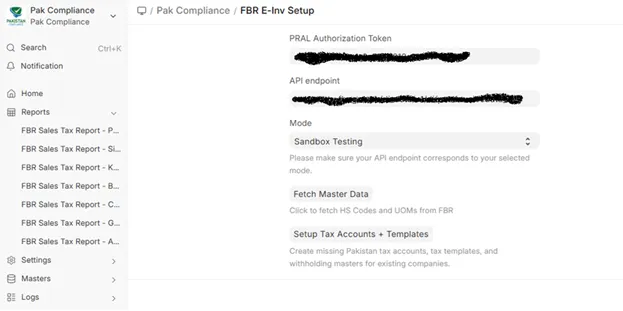
FBR E-Inv Setupwith sandbox and production modes- payload preview from invoice forms through
Show FBR Payload - direct invoice submission through
Post to FBR - bulk Sales Invoice submission from list view through
Submit to FBR - POS auto-submission on submit
- queue-based background processing with
FBR QueueandFBR Logs - Pakistan tax-account, item tax-template, province tax-template, and withholding setup helpers
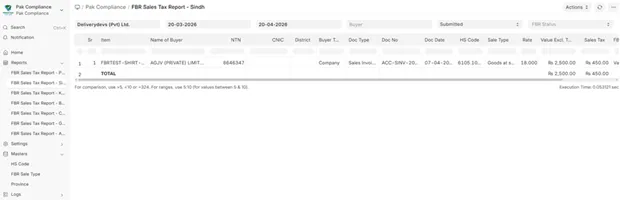
- provincial sales tax reports
- FBR Sales Invoice and FBR POS Invoice print formats
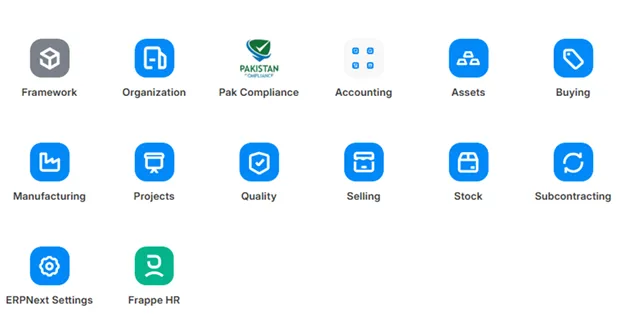
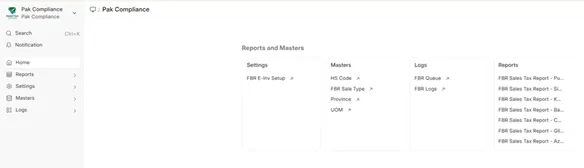
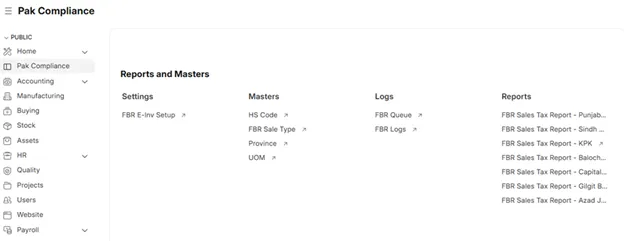
- Pak Compliance workspace with setup, masters, queue, logs, and report access
Compatibility
Use the branch that matches your Frappe / ERPNext major version.
| Frappe / ERPNext | Git branch |
| Version 15 | version-15 |
| Version 16 | version-16 |
Installation
Clone the branch that matches your stack, then install the technical app name fbr_e_invoicing.
What Install Sets Up Automatically
On install and migrate, the app provisions the app metadata it ships with, including: - workspace and navigation entries - custom fields and client scripts - FBR setup, queue, log, and master doctypes - fixtures and setup instructions block - provincial sales tax reports - FBR Sales Invoice and FBR POS Invoice print formats - Pakistan tax-account and tax-template setup hooks
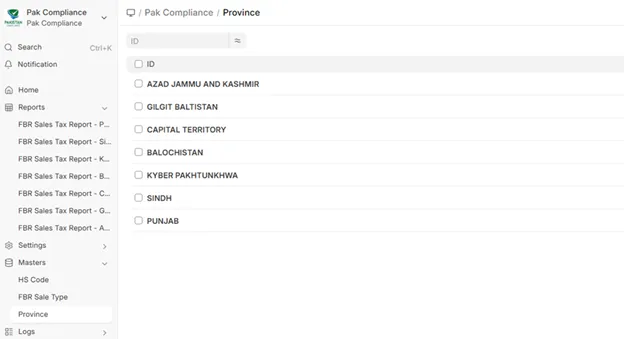
These masters are populated automatically: - provinces - FBR sale types
HS Codes and UOMs are not fetched on a fresh install. The sync requires a valid PRAL authorization token, and that token is normally empty until you configure FBR E-Inv Setup. Treat HS Code and UOM fetching as a manual post-setup step through Fetch Master Data.
First-Time Setup
Open FBR E-Inv Setup from the Pak Compliance workspace and complete the setup in this order:
- Enter
PRAL Authorization Token. - Choose
Mode. - Enter the matching
API Endpoint. - Save the document.
- Click
Fetch Master Data. - Click
Setup Tax Accounts + Templatesif you need to create or backfill Pakistan tax accounts and templates for existing companies.
Mode and API Endpoint
Mode controls whether the app is working against FBR's sandbox-testing flow or the live production flow.
| Mode | Endpoint to use | Purpose |
Sandbox Testing | https://gw.fbr.gov.pk/di_data/v1/di/postinvoicedata_sb | test submissions and sandbox payload behavior |
Production | https://gw.fbr.gov.pk/di_data/v1/di/postinvoicedata | live submissions to FBR |
Important notes: - The app does not auto-switch the endpoint for you. The value in API Endpoint must match the selected mode. - Sandbox Testing uses sandbox-specific payload behavior, including scenarioId. - Production is for real submission and should only be used with the live endpoint and live credentials.
Daily Workflows
Sales Invoice
The app adds FBR validation and submission controls to Sales Invoice.
Available actions and behavior: - Show FBR Payload lets users inspect the payload that will be sent. - Post to FBR is available on submitted invoices. - Sales Invoice list view includes a bulk action: Submit to FBR. - Submission status is reflected on the form through FBR status fields and indicators.
POS Invoice
The app adds FBR validation and POS submission behavior to POS Invoice.
Available actions and behavior: - Show FBR Payload lets users inspect the POS payload. - on submit, the app automatically submits or queues the POS invoice for FBR processing - Post to FBR is available for submitted invoices in failure or retry states - submission status is reflected on the form through FBR status fields and indicators
POS is not auto-submitted on save. The automatic flow happens on submit.
Queue and Logs
The operational doctypes are available from the Pak Compliance workspace: - FBR Queue - FBR Logs
Queue processing runs through the scheduler. The shipped scheduler event processes the FBR queue every 15 minutes.
Pakistan Tax Setup
The app includes Pakistan-specific setup helpers and data for: - tax accounts - item tax templates - province-specific tax charge templates - withholding defaults
Use Setup Tax Accounts + Templates from FBR E-Inv Setup when you need to create or backfill this data for existing Pakistan companies.
Workspace, Masters, Reports, and Print Formats
App-Owned Records and Masters
The app ships and exposes these main records and masters: - FBR E-Inv Setup - FBR Queue - FBR Logs - HS Code - FBR Sale Type - Province
The workspace also links to standard UOM records because they are part of the FBR master-data workflow.
Reports
The app ships provincial sales tax reports for: - Punjab - Sindh - KPK - Balochistan - Capital Territory - Gilgit Baltistan - Azad Jammu and Kashmir
Print Formats
The app ships these print formats: - FBR Sales Invoice - FBR POS Invoice
Troubleshooting
- If
Fetch Master Datafails, verify thatPRAL Authorization Token,Mode, andAPI Endpointare all set correctly and match each other. - If you are using
Sandbox Testing, make sure you are using the sandbox endpoint. If you are usingProduction, make sure you are using the live endpoint. - Do not expect HS Codes and UOMs to appear on a clean install until credentials are configured and
Fetch Master Datahas been run successfully. - If queue items stay pending, remember that scheduled processing runs every 15 minutes.
- If you are updating an existing site, run
bench --site <site-name> migrateafter pulling the new code.
Future Work
- a dedicated operational dashboard with a route/UI, real-time stats, queue counts, and recent activity
- richer retry-policy controls such as priority-based processing, configurable retry limits, and backoff strategy controls
- user-facing alerts and notification workflows
Technical Notes
- GitHub repository:
https://github.com/DeliveryDevs-ERP/Pakistan-Compliance - user-facing name:
Pak Compliance - technical install name:
fbr_e_invoicing
License
This project is licensed under the MIT License.
User Reviews
No reviews yet, be the first to review.
0.0
0 rating
More apps from



Explore more apps