Frappe
Cloud
Marketplace
Frappe
Products
Insights
.webp)
Installation Guide
installs
Publisher
Supported versions
Categories
E-Commerce
About
theme and Sounds
Per-user theme and sound personalization for Frappe & ERPNext Desk — live color editor, curated WCAG-validated palettes, 17 bundled themes, and a Sound Studio that lets every user pick their own audio for save / submit / login / notifications and more.
Main features
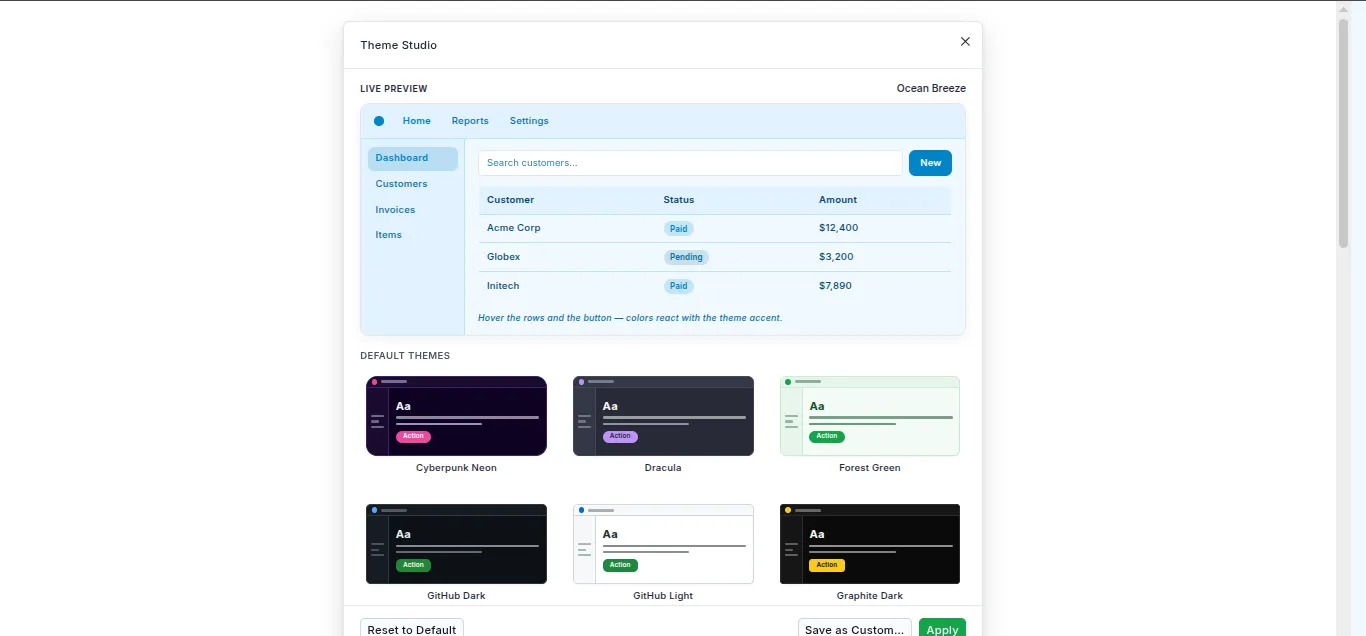
Theme Switcher (gallery):
17 ready-made themes bundled on install — Midnight Indigo, Dracula, Tokyo Night, GitHub Light/Dark, Solarized, Nord Frost, Cyberpunk Neon, High Contrast, and more.
One-click apply with instant preview. Switch between Default / Custom / Public tabs to browse.
"Reset to Frappe Default" reverts the UI without uninstalling the app..
Theme Editor (live, side-by-side):
Basic tier — background, text, accent, font family, font size, corner radius, hover lift.
Advanced tier — surface colors, input bg, button colors, muted text, border, font weight, transition duration.
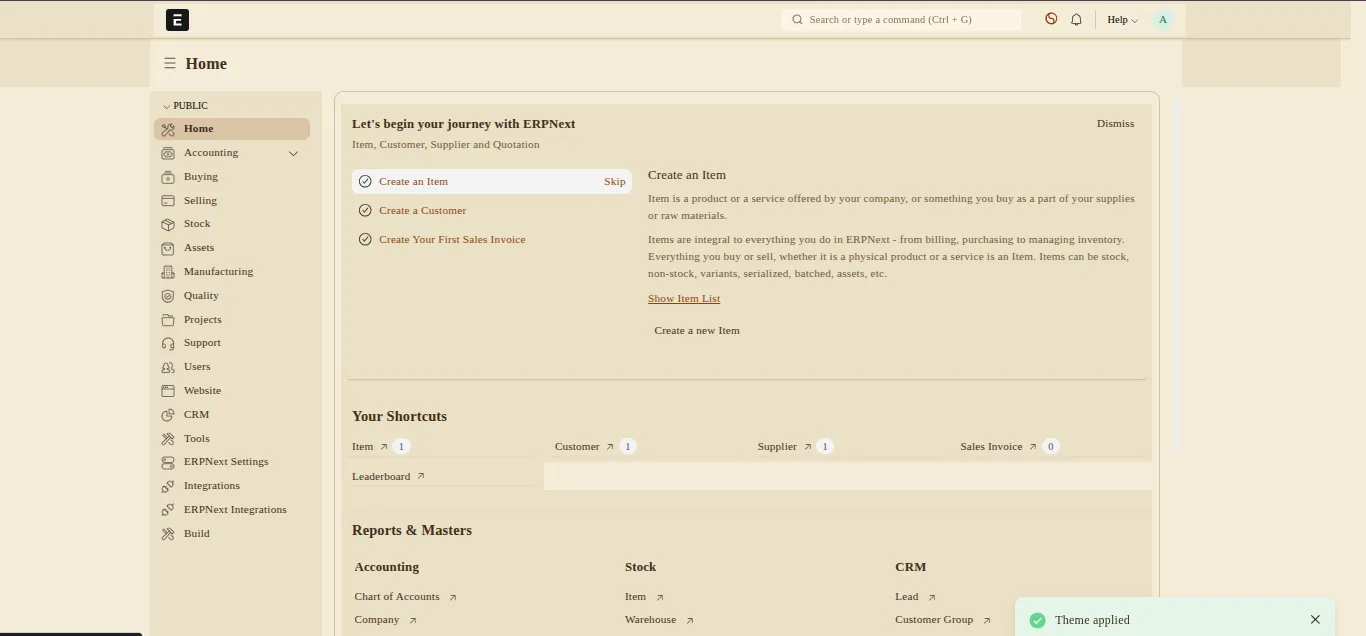
Every change previews live on the Desk behind the dialog before you save.
Save private themes (only you see them) or share publicly with the whole team.
Built-in WCAG contrast guard validates
text/bg,text/surface, andbutton-text/button-bgto AA before save.
Curated Palettes:
8 WCAG-AA-validated palettes — Indigo Mist, Forest Paper, Rose Quartz, Graphite Amber, Midnight Violet, Carbon Teal, Obsidian Rose, Nordic Frost.
One click previews the full 11-token palette; save persists it as your active theme.
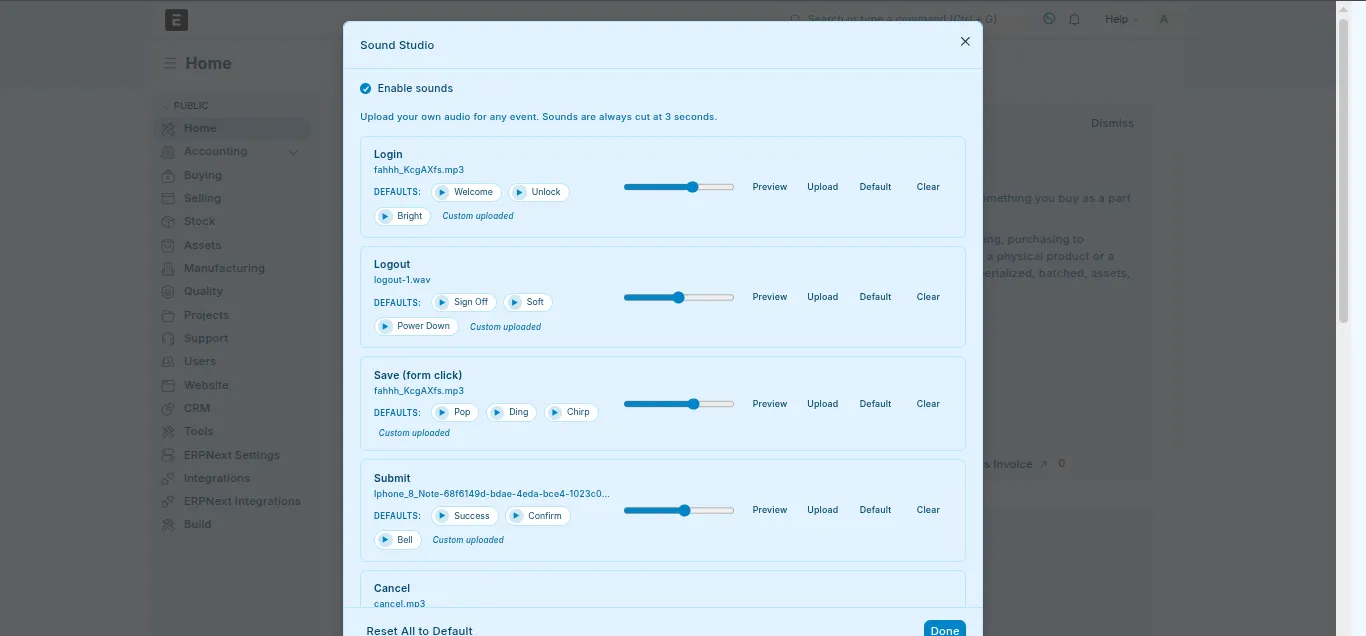
Sound Studio (per-user audio):
Customize sounds for 12 Desk events:
save,submit,cancel,delete,error,email,alert,notification,click,login,logout,missing_fields.Three built-in presets per event (Glitch / Buzz / Chirp / Beam …) plus drag-and-drop custom
.mp3/.wavuploads.Per-event volume slider, master enable/disable, "Reset All to Default".
Every sound is capped at 3 seconds regardless of file length — no runaway 30-second loops.
Marketplace-clean integration:
Zero changes to Frappe core files — all customizations layer on through
hooks.py.Preferences persisted in app-owned DocTypes (
User Theme Preference,User Sound Preference,Theme Definition).boot_sessioninjection means the first paint is themed — no flash of unstyled UI.Bootinfo cache is invalidated on every preference write, so changes survive logout/login round-trips.
Operations:
Whitelisted Python + JS APIs to drive theme/sound changes from your own buttons / hooks / scripts.
17 default themes shipped as fixtures — re-syncing them is idempotent and safe.
Migration patches (
v1_0/v1_1/v1_2) handle upgrades cleanly between releases.
Setup and Use
Nothing to configure on install. The app injects a theme switcher icon into the navbar and a Sound Settings link into the user dropdown the first time the Desk loads.
Pick a theme
Click the circle-half icon in the navbar.
Tab | What you see |
|---|---|
Default | The 17 themes shipped with the app |
Custom | Themes you've saved privately |
Public | Themes other users have shared |
Click any card to apply instantly. Click Customize to open the editor and tweak it before saving as your own.
Edit a theme live
The editor opens with a Basic tab (the colors most people change) and an Advanced tab (surface, button, border, motion). Every slider / picker pushes the change to the page behind the dialog in real time.
Field | What it controls |
|---|---|
Background | The Desk's primary backdrop |
Surface / Cards | Card, modal, and sidebar background |
Accent / Accent Hover | Links and highlight color |
Button Color / Button Hover / Button Text | Primary action buttons |
Font Family / Size / Weight | Body typography |
Corner Radius | Border-radius applied across cards and inputs |
Animation Speed | Transition duration for hover / focus |
Hover Lift | Subtle elevate-on-hover effect for cards |
Click Save Custom Theme → name it → optionally tick Share with team to publish it.
WCAG contrast guard
Before any custom theme is saved, the editor validates:
text_primaryonbg_primarypasses AA (≥ 4.5:1)text_primaryonbg_surfacepasses AA (≥ 4.5:1)button_textonbutton_bgpasses AA-large (≥ 3.0:1)
Failing combinations are blocked with a clear message — you can't ship an unreadable theme by accident.
Customize sounds
Open the user dropdown (top-right avatar) → Sound Settings.
Each row is one event. From left to right:
Event name + current file
Volume slider (0–100%)
Preview / Upload / Default / Clear actions
Three preset chips with their own ▶ preview button
Event | When it fires |
|---|---|
Login | First Desk load after |
Logout | Just before the logout request flies |
Save (form click) | Form save success |
Submit | Document submit success |
Cancel | Document cancel |
Delete | Document delete |
Error | Server / client errors |
Email sent toast | |
Alert |
|
Notification (bell) | Realtime notifications |
Missing Fields | The "mandatory fields required" popup on save |
Click a preset chip to assign it (saves automatically). Drop an audio file with Upload to use your own. Default restores Frappe's stock sound for that event. Reset All to Default in the footer wipes every customization in one click.
Reset to Frappe defaults..
From the theme switcher dialog, click Reset to Frappe Default. Your User Theme Preference row is deleted and the next page load renders stock Frappe. Sound customizations are unaffected — use Reset All to Default in Sound Studio for those.
API
Whitelisted Python entry points — callable from JS or REST.
# Theme — read + write
fintheme_and_sounds.api.get_available_themes()                       # → {defaults, owned, public}
fintheme_and_sounds.api.get_active_theme()                           # → {theme, overrides}
fintheme_and_sounds.api.set_active_theme(theme_name, overrides=None) # apply a theme
fintheme_and_sounds.api.save_custom_theme(payload, share_public=0)   # create/update a theme
fintheme_and_sounds.api.delete_custom_theme(theme_name)
fintheme_and_sounds.api.clear_active_theme()                         # back to Frappe stock
fintheme_and_sounds.api.get_recommended_palettes()                   # the 8 curated palettes

# Sounds — read + write
fintheme_and_sounds.api.get_user_sounds()                            # → {enabled, mapping}
fintheme_and_sounds.api.set_user_sound(event_key, file_url, volume=0.5)
fintheme_and_sounds.api.clear_user_sound(event_key)
fintheme_and_sounds.api.toggle_user_sounds(enabled)                  # 0/1 master switch
fintheme_and_sounds.api.clear_all_user_sounds()
All endpoints respect Frappe's permission system and invalidate the per-user bootinfo cache on write, so the next page load picks up the change without a bench restart.
JS helpers are exposed on window:
// Open the same dialogs the navbar / dropdown buttons open
window.openThemeSwitcher();
window.openSoundStudio();

// Apply theme / sound preferences at runtime
ThemeManager.applyTheme(theme, overrides);
SoundManager.applyMapping({ login: { url: "/files/my.mp3", volume: 0.6 } });
SoundManager.setEnabled(true);
The full sound playback pipeline (event → audio element → 3-second cap → volume) is wired in sound_manager.js; the editor UI is in sound_studio.js.
Limitations
Theme scope — themes recolor the Desk via CSS variables. Pages that hard-code colors in their own CSS (third-party app dialogs, charts with baked-in palettes) may not pick up every token.
Public themes are global — sharing a custom theme publicly makes it visible to all users on the site. There's no per-role visibility.
Sound autoplay — browsers block audio on the very first page load before any user gesture. The login sound is played 250ms after Desk ready; if your browser's autoplay policy is strict, it may silently skip the first one and play normally from the next event onwards.
Default theme updates — new default themes added in an upgrade re-sync as fixtures; existing custom themes are never overwritten.
Sound files are stored as standard Frappe File records under
Home/Attachments. Very large uploads count against the user's file quota.
Dependencies
Frappe v15
Python 3.10+
MariaDB 10.6+ with InnoDB
Modern browser with HTMLMediaElement support (Chrome / Firefox / Edge / Safari 14+)
Sounds
Every bundled sound in fintheme_and_sounds/public/sounds/ is an original tone synthesised from scratch by tools/generate_sounds.py using only the Python standard library — no recordings, no samples, no third-party audio. There are 36 files: 12 Desk events × 3 presets each, with preset 1 of every event registered as the default.
To retune or regenerate them, edit the recipes in tools/generate_sounds.py and run:
python3 tools/generate_sounds.py
Because the audio is generated, it carries no external license or attribution requirement — it is covered by the same MIT license as the rest of the app.
License
MIT — see license.txt. This covers the application code, the bundled themes and palettes, and the synthesised sound files alike.
Built with Frappe · by Finstein
User Reviews
No reviews yet, be the first to review.
0.0
0 rating
More apps from
Explore more apps