Frappe
Cloud
Marketplace
Frappe
Products
Insights
.webp)
Installation Guide
installs
Publisher
Supported versions
Categories
E-Commerce
About
Easy setup: existing Subscriptions get copied from ERPNext (you have to cancel them manually though)
How to
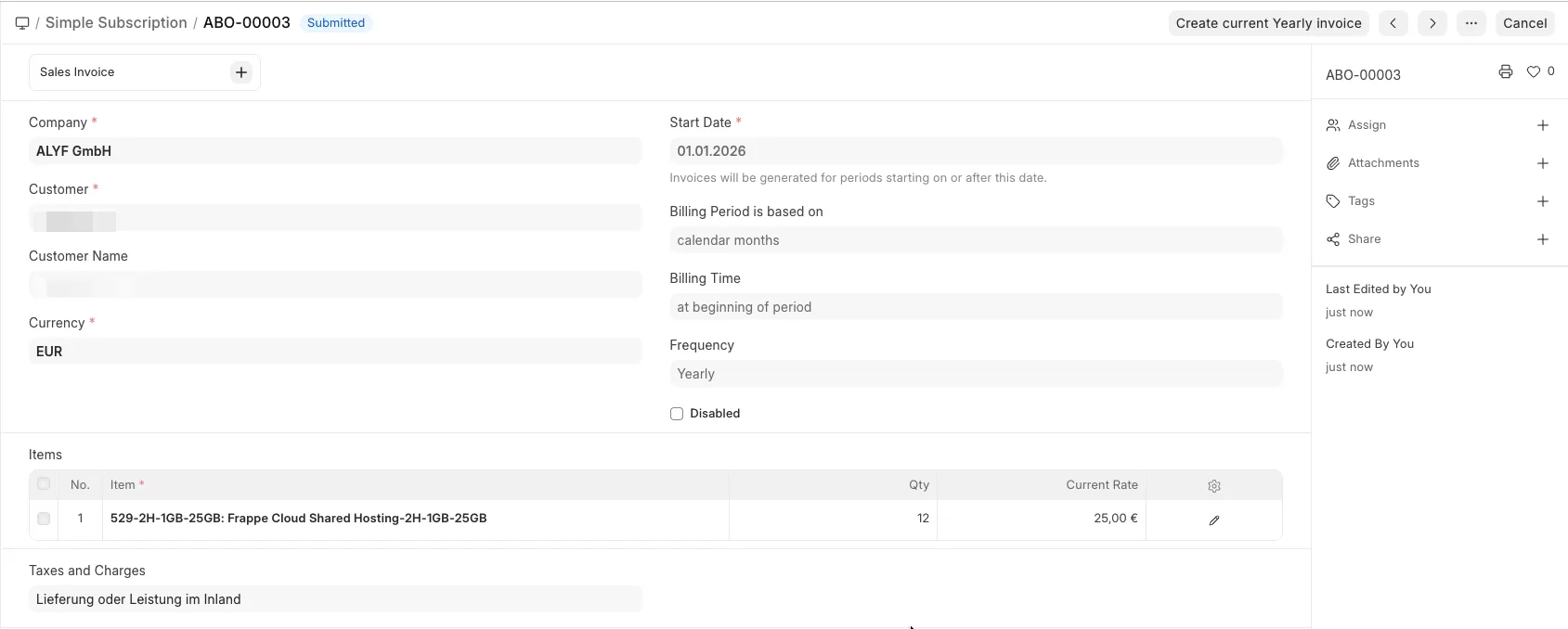
Create a new Simple Subscription
Select a Customer
Set a Start Date
Select if billing is based on calendar months or Start Date
Select if billing is supposed to happen at the beginning of period or after end of period
Select a Frequency
Add items to the table
Select a Sales Taxes and Charges Template
Click "Save"
Actions
Submit a Simple Subscription to start generating invoices.
New invoices for the current period will automatically be generated once per day if they don't yet exist
If you need an invoice immediately, click the button "Create current {Monthly / Quarterly / Yearly} invoice".
Mark a Simple Subscription as disabled to stop generating invoices.
Duplicate a disabled Simple Subscription to change any values.
User Reviews
No reviews yet, be the first to review.
0.0
0 rating
More apps from



Explore more apps