Frappe
Cloud
Marketplace
Frappe
Products
Insights
Installation Guide
installs
Publisher
Supported versions
Categories
E-Commerce
About
🏭 Warehouse Theatre 3D
Free warehouse app for ERPNext: a live 3D and 2D map of the warehouse you already have, a Stock Health report that works the moment you install it, and a phone app to put away, pick and count by scanning.
ERPNext v15 · v2.0 · Vue 3 · Three.js r128 · License MIT · Price Free
What it does
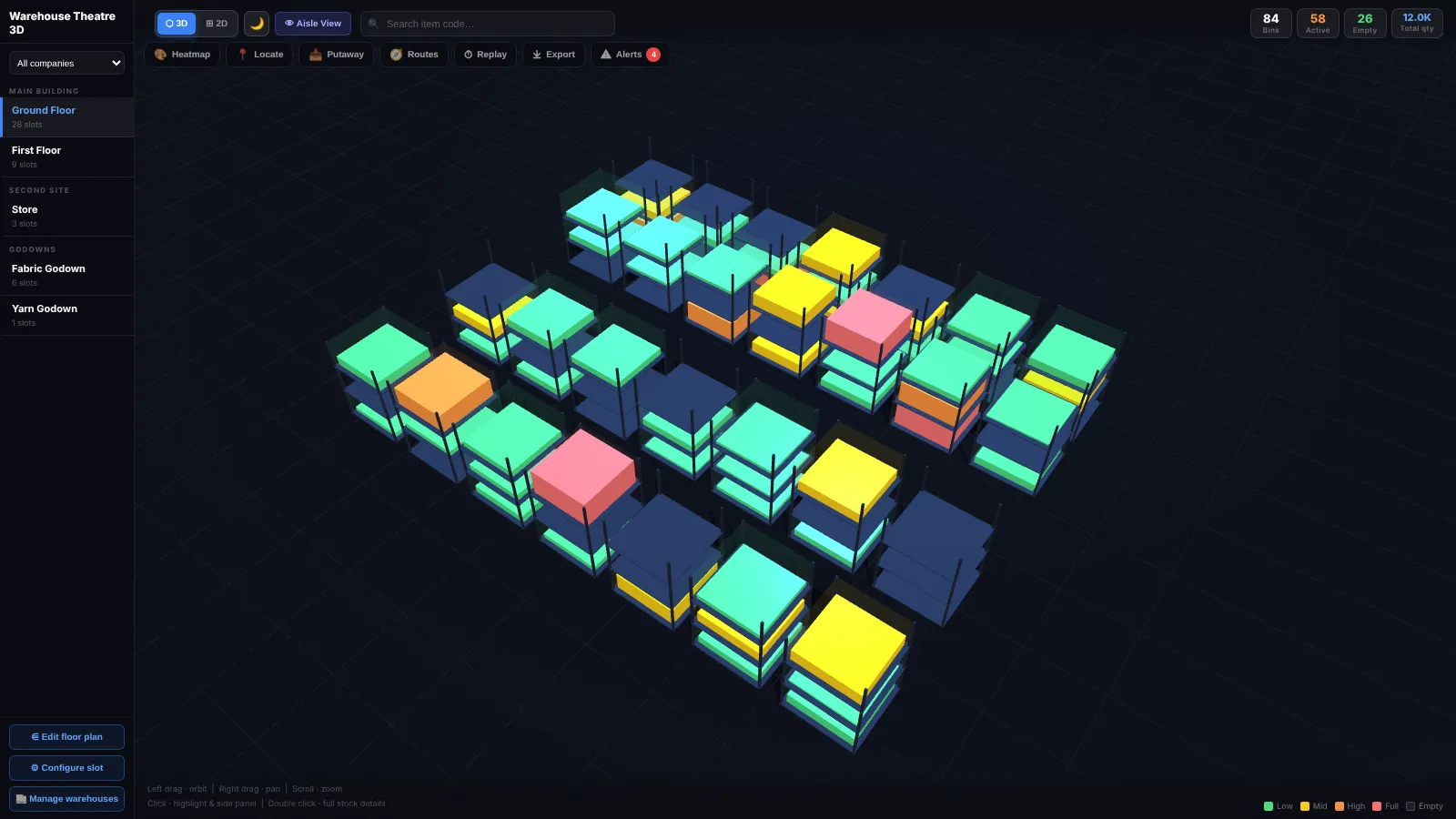
Most ERPNext warehouse setups are a flat list of names in the Warehouse tree. Warehouse Theatre 3D turns that tree into a warehouse you can see, check and work in. Stock levels, fill percentage and item detail come live from your existing Bin data.
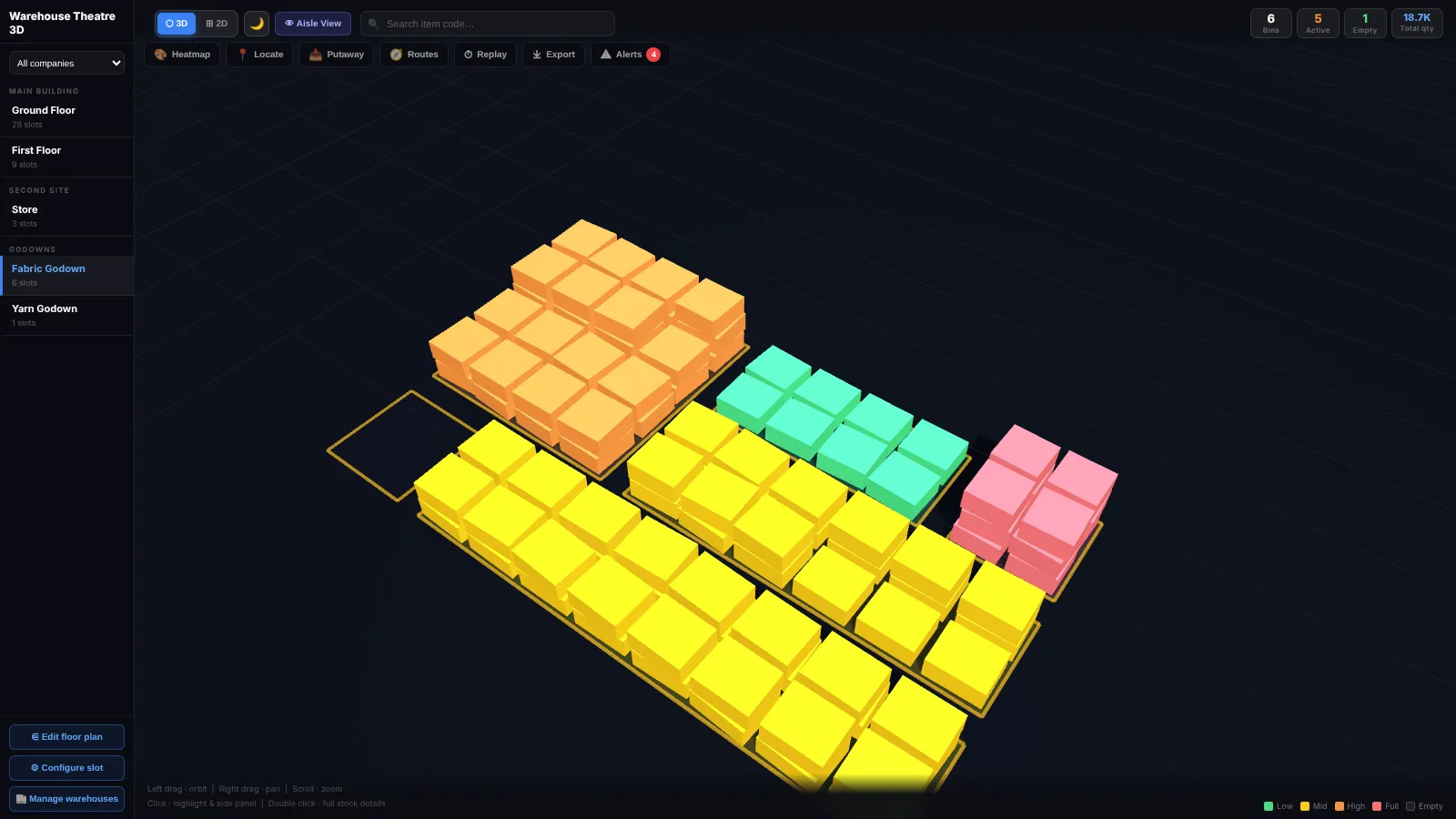
It works the way your warehouses actually are: shelves on racks, stock stacked on the floor of a godown, or both on the same floor.
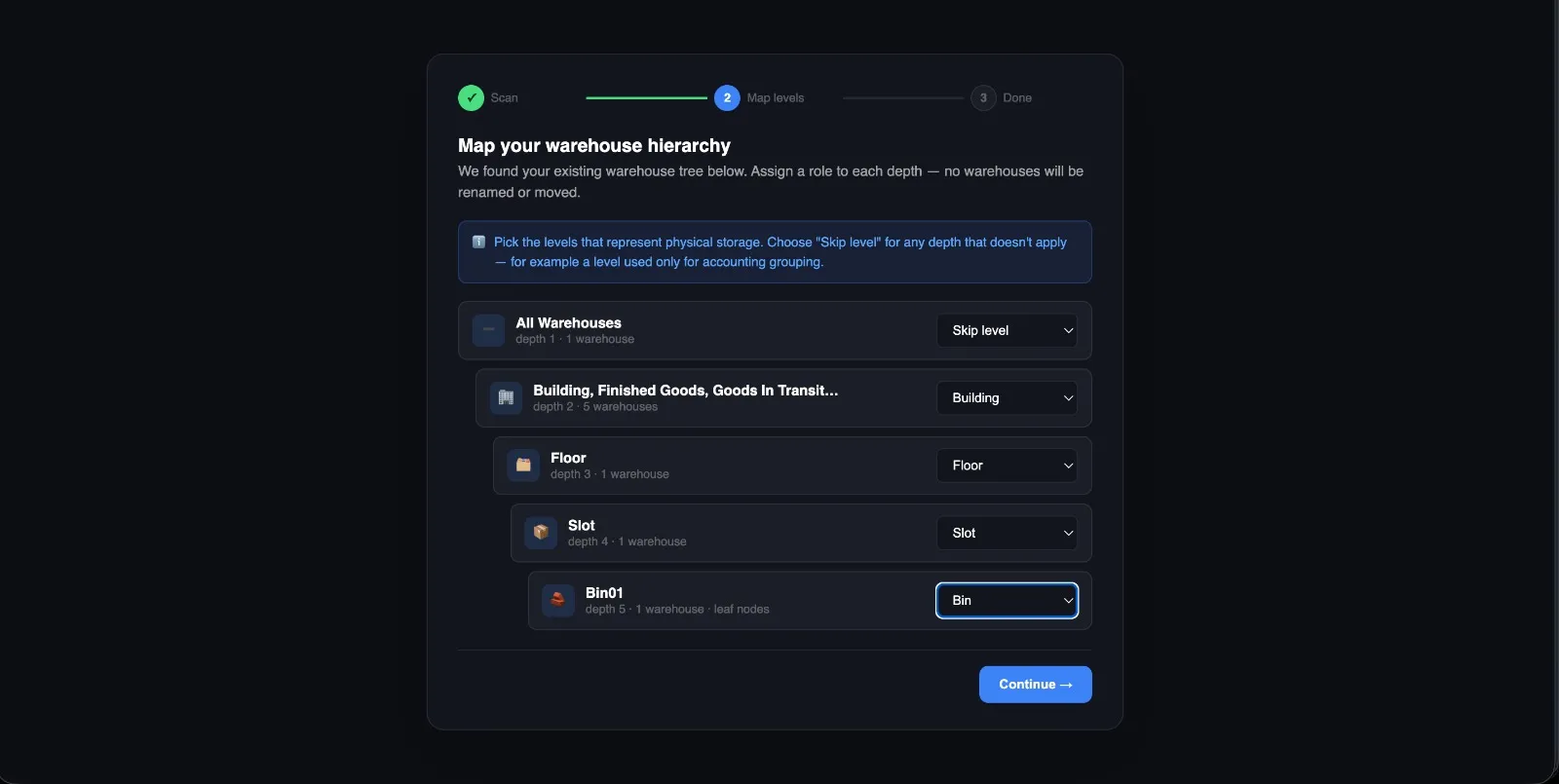
No relabeling required. A one-time setup wizard reads the warehouse hierarchy you already have and asks you to assign a role to each level. It never renames or moves anything.
✨ Features
📱 Warehouse Scan (phone app)
Put away: scan a receipt and get the best location for each item; scan the shelf to confirm
Pick: walk a Pick List in walking order; wrong items and wrong batches are caught
Cycle count: a “due for counting” list, scan-to-count and blind count; differences become a draft Stock Reconciliation
Look up: scan a shelf to see what’s on it, or an item to see where it is
QR labels: print location labels for every shelf, 24 or 8 per A4 sheet
Works with the phone camera or hand-held scanners, and installs to the home screen
🩺 Stock Health (no setup needed)
Dead stock, slow movers and stock age (first-in-first-out)
Expiring batches, items below reorder level, negative stock and value by warehouse
🧾 Inside ERPNext forms
Show on warehouse map on Items, Stock Entries, receipts, Delivery Notes, Pick Lists and Material Requests
Shelf locations on the Item form; putaway, pick and count buttons that open on the map or the phone
🗺️ See the warehouse
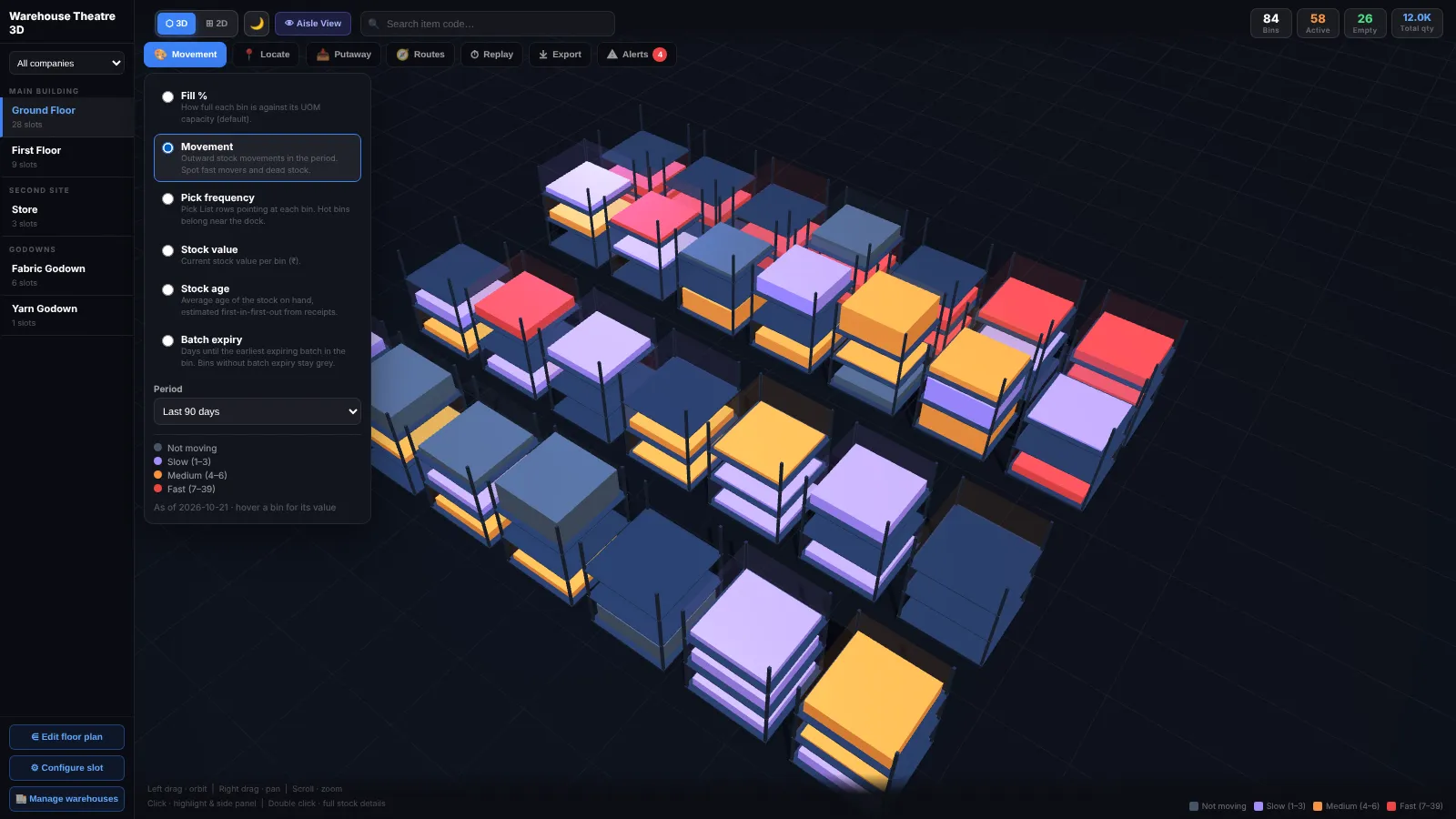
3D view: racks and shelf levels you can orbit, pan and zoom, coloured by how full they are
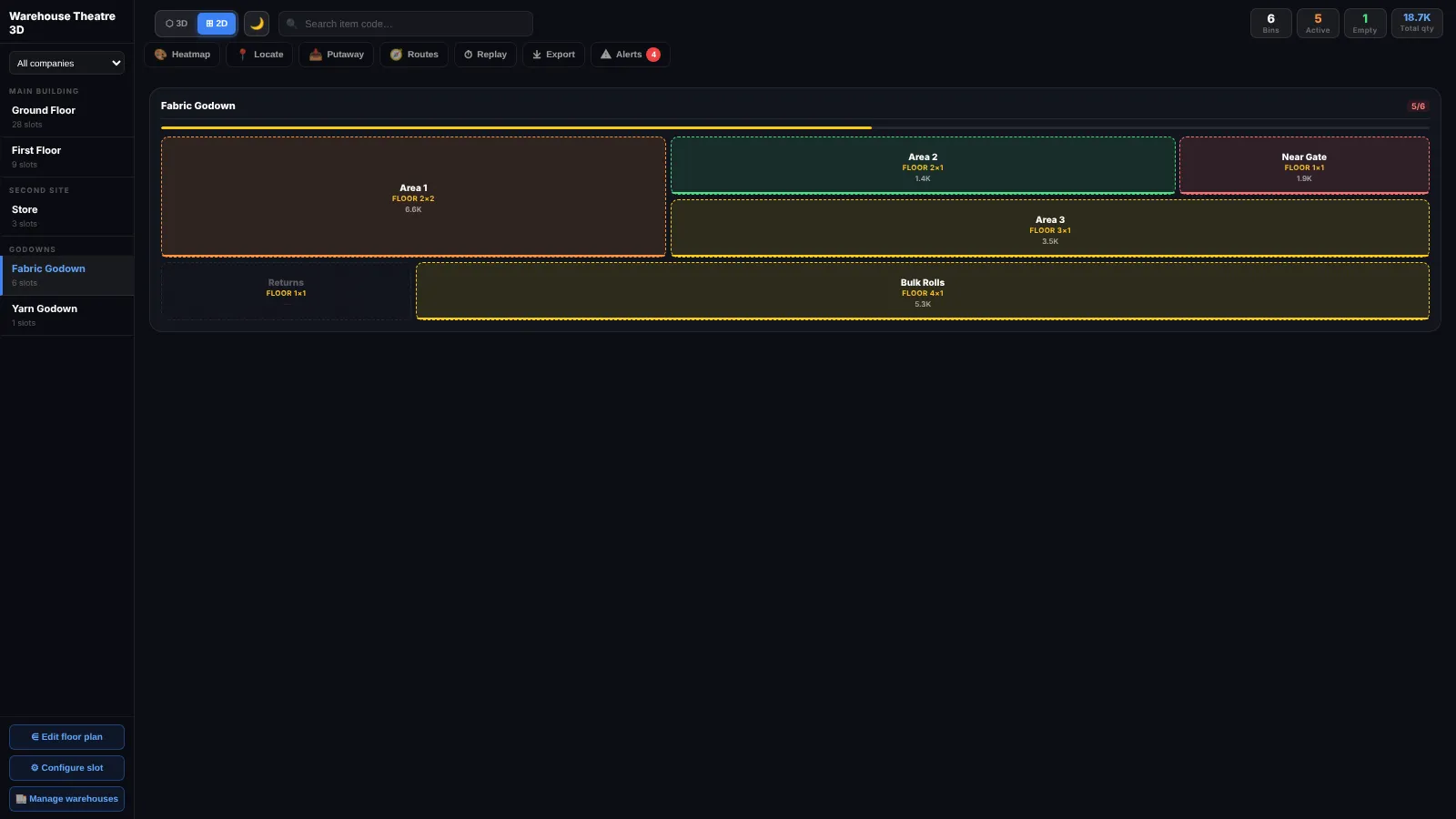
Floor storage: godowns without racks drawn as stacked bales that rise as they fill
2D floor view: a grid of rack tiles with fill shown per shelf level
Aisle walk-through: a first-person walk down any aisle
Heatmaps by movement, pick frequency, stock value, stock age or batch expiry
Live stock data: quantity, reserved, UOM fill % and stock value from ERPNext Bins
📈 Plan and act
Item locator: find any item, barcode, batch or serial number on the map
Move stock and count bins straight from the map, plus each bin’s stock ledger
Putaway suggestions, ranked by free space, distance from the dock and shelf height
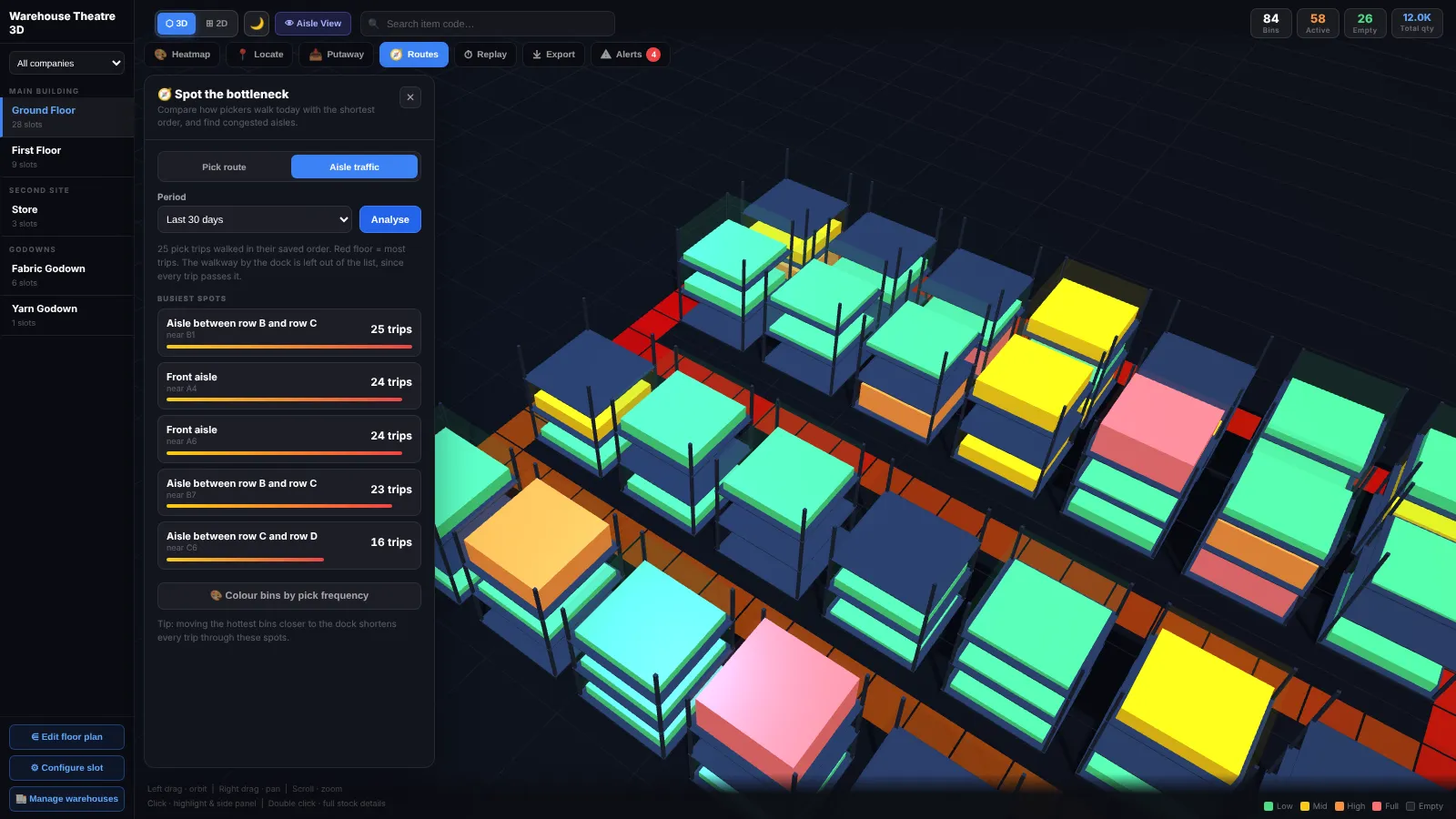
Pick-route optimisation: the shortest walking order, with the metres saved
Aisle traffic, timeline replay (up to a year) and capacity alerts (with optional daily email)
Export: 3D snapshot, printable floor plan (PNG or A4 PDF) and a CSV of every bin
⚙️ Set up and manage
Setup wizard: done in under two minutes; floor storage is detected automatically
Floor plan editor: set row and column positions, with adjustable aisle gaps
Manage warehouses: add or remove shelf levels and set capacities without leaving the app
Multi-company switcher, dark and light theme, and mobile touch controls
🏗️ How the hierarchy works
The app uses five roles and adapts to your tree’s depth instead of requiring a naming convention:
Whatever you already have          → Role you assign in the wizard
──────────────────────────────────────────────────────────────────
Depth 1  (e.g. "Main Campus")      → Building (optional)
Depth 2  (e.g. "Ground Floor")     → Floor
Depth 3  (e.g. "A1", "A2", "B1")   → Slot  (shown as a rack)
Depth 4  (e.g. "L1", "L2", "L3")   → Bin   (shown as a shelf level)
Godown areas with no shelves       → Zone  (floor storage)
If your tree is only 3 levels deep, skip Building. If a level doesn’t map cleanly, mark it “Skip”. Godowns without racks become Zones automatically, whether they’re split into area warehouses, kept as a single warehouse, or mixed with racks on the same floor.
Stock is tracked at the Bin level, the same as standard ERPNext. The app reads tabBin directly, so there’s no data migration.
🔒 Safe by design
Everything runs with each user’s own ERPNext permissions.
Map actions save drafts by default; stock counts are always drafts for a Stock Manager to submit.
Batch- and serial-tracked items are saved as drafts, to finish in ERPNext.
System Manager edits layouts. Stock Manager and Stock User can view everything and use the phone app.
📦 Installation
Available on the Frappe Cloud Marketplace. Install it from your site’s Marketplace Apps page; no manual setup is needed. Then open Warehouse Theatre 3D or Warehouse Scan from the /apps screen, or go to /warehouse-theatre-3d.
🚀 First-time setup
Stock Health works straight away.
Open the app and the setup wizard launches:
Scan: reads your Warehouse tree and groups it by depth
Map levels: assign a role (or Skip) to each depth
Done: review the counts and open the 3D view
Once: set the dock (Putaway → Set dock), and add UOM capacities so fill %, putaway and alerts are accurate.
Phone app: in Warehouse Scan, print location labels and stick one on each shelf. Then open
/warehouse-scanon each phone:Android: Chrome ⋮ → Install app
iPhone: Safari Share → Add to Home Screen
Hand-held scanners: set keyboard output with Enter after each scan
No SQL, no manual custom field setup, no need to rename any warehouse.
🎮 Controls
Action | Control |
|---|---|
Orbit / pan / zoom | Left drag / right drag / scroll (pinch on touch) |
Highlight + side panel | Single click |
Full stock details | Double click |
Walk an aisle | 👁 Aisle View, then W/A/S/D or on-screen buttons; Esc to exit |
2D view | Click a tile for stock details, or a level row for that shelf |
Tools | Toolbar: Heatmap, Locate, Putaway, Routes, Replay, Export, Alerts |
🛠️ Tech stack
Layer | Technology |
|---|---|
Frontend | Vue 3 via CDN, no build step |
3D engine | Three.js r128 |
Backend | Frappe / ERPNext v15 |
Phone app | Installable web app with camera barcode scanning |
💸 Pricing
Free. Always. Listed on the Frappe Cloud Marketplace under Frappe’s revenue-sharing program for free apps. Install it and use it; no license keys.
🐛 Troubleshooting
Problem | Fix |
|---|---|
Setup wizard shows no warehouses | Create at least one Warehouse first |
Racks or areas overlapping | Set positions in Edit floor plan |
A godown shows as racks | Set its areas to Zone in Manage warehouses |
Fill % shows nothing | Add a UOM capacity to the shelf or floor area |
Camera says it needs https | Serve the site over https, or use a hand-held scanner |
App not on the /apps screen | Your role must be System Manager, Stock Manager or Stock User |
🏢 Publisher
Aravind G · aravindsprint/warehouse_theatre_3d
📄 License
MIT
User Reviews
5 stars
%
4 stars
%
3 stars
%
2 stars
%
1 star
%
•
Reply
•
Reply
•
Reply
4.7
3 rating
More apps from

Explore more apps