Frappe
Cloud
Marketplace
Frappe
Products
Insights

Installation Guide
installs
Publisher
Supported versions
Categories
E-Commerce
About
Dashboards your team will actually open
Lumen turns the data already in your Frappe or ERPNext site into fast, good-looking
dashboards that keep themselves current. No data warehouse, no exports, no
developer ticket.
It is not a BI suite for analysts. It is an operational dashboard layer for the
people who run the business: the shop floor, the warehouse, the sales team.
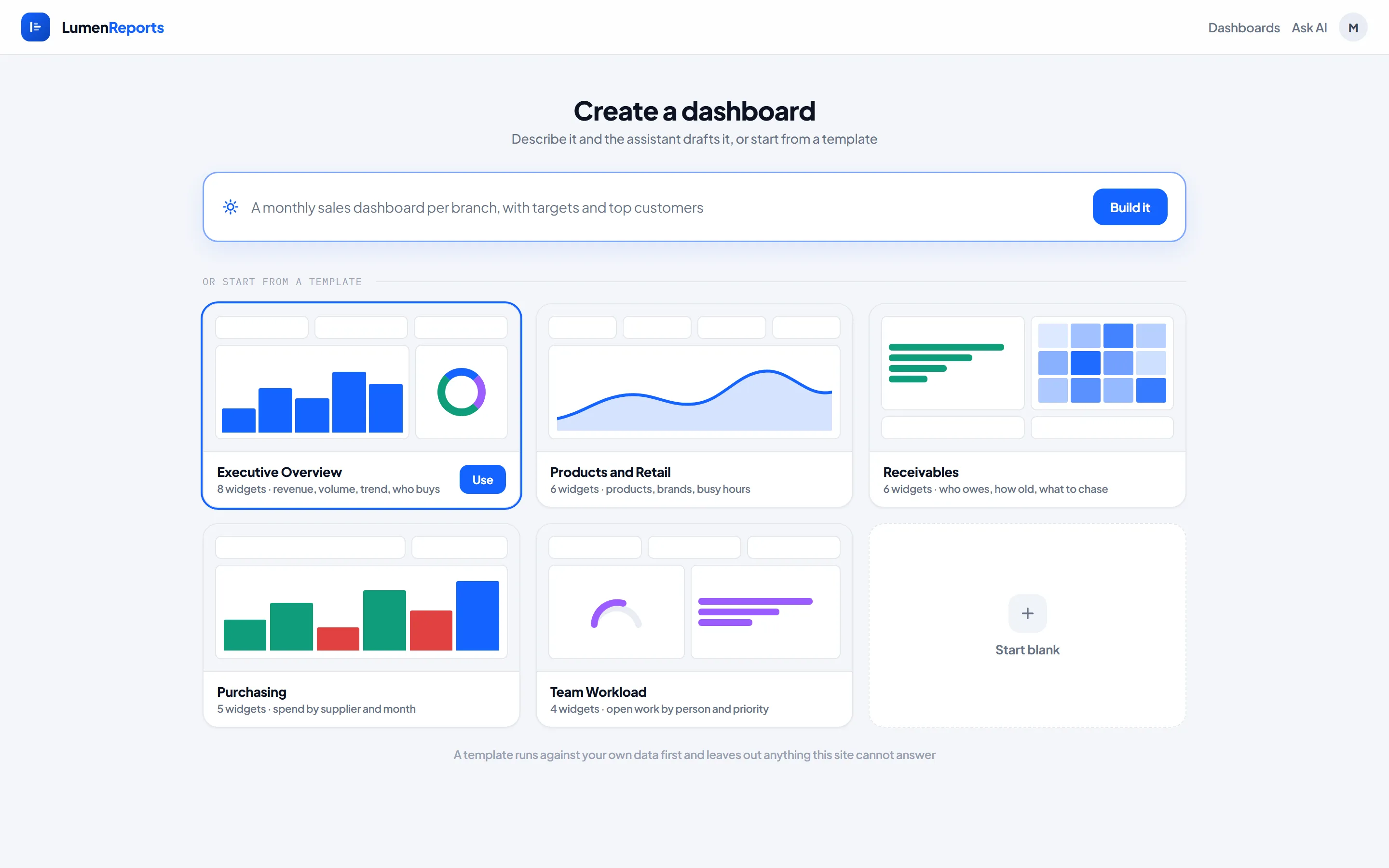
Start from a template
Pick a starting point and Lumen builds it from your own data: Executive Overview,
Products and Retail, Receivables, Purchasing or Team Workload. Each template runs
against your site first and leaves out anything your data cannot answer, so you
never start with a broken chart. You only see the templates your site can support.
Team Workload works on any Frappe site. The other four use ERPNext data.
Design it in the studio
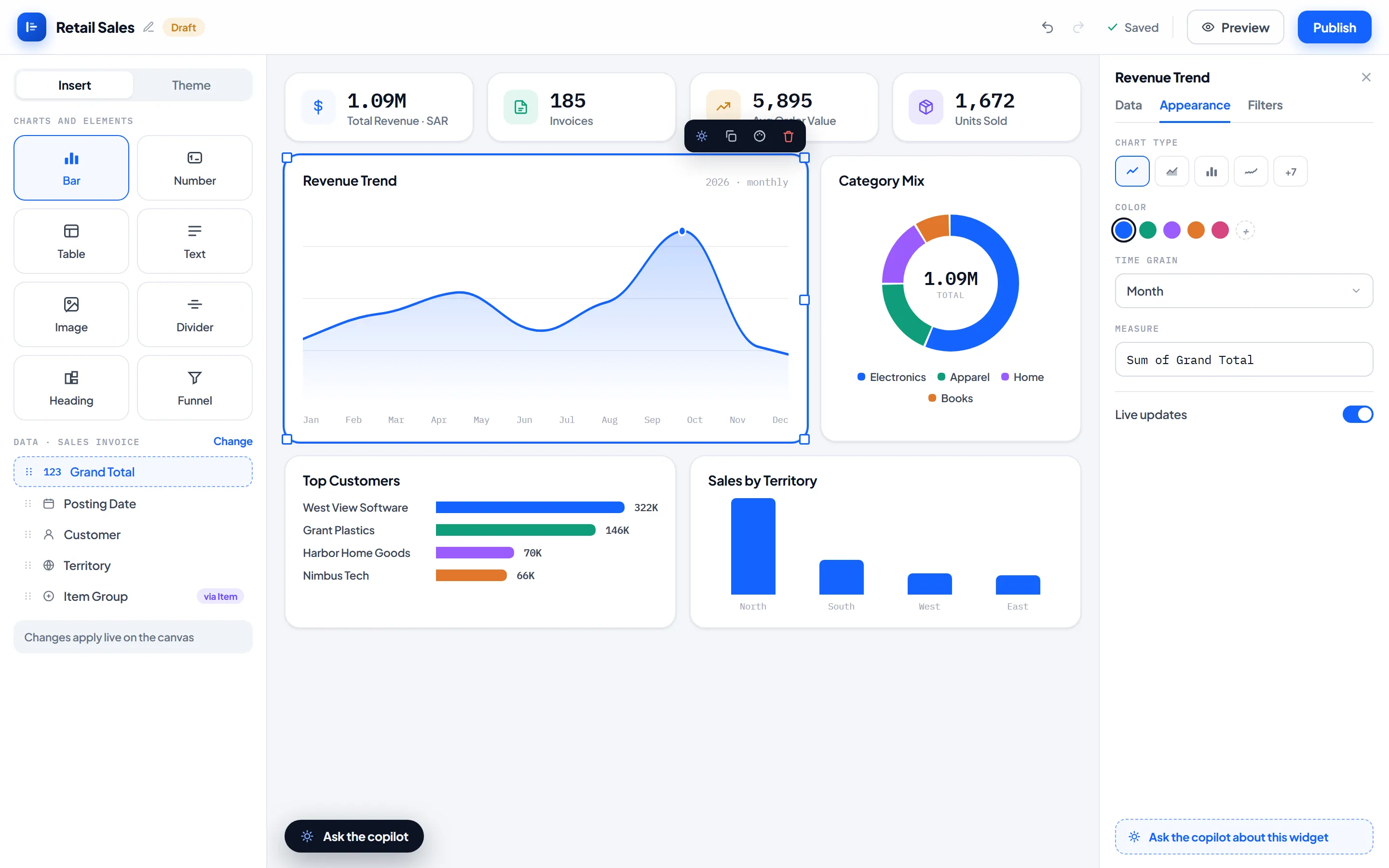
Click any widget and edit it in the side panel while the canvas updates live. Drag
and resize on a 12-column grid, undo and redo every step, and duplicate with a
shortcut. Drafts save themselves. A published dashboard changes only when you click
Save changes, so viewers never see a half-finished edit.
19 chart types and 4 layout elements, all in one design language:
Trends: line, area, sparkline, waterfall
Comparisons: bar (single or grouped), stacked bar, ranked bars, radar
Composition: donut, pie, funnel, radial rings
Progress: number cards, gauge, progress bars
Patterns: heatmap, scatter and bubble
Detail: tables and expandable tree reports
Layout: headings, text notes, dividers and images
The chart that suits your data is chosen for you. A distribution across hours
becomes bars, not a pie. Fifty categories become ranked bars, not an unreadable
donut. You can always switch, but only to the forms that also make sense.
Make it look like yours
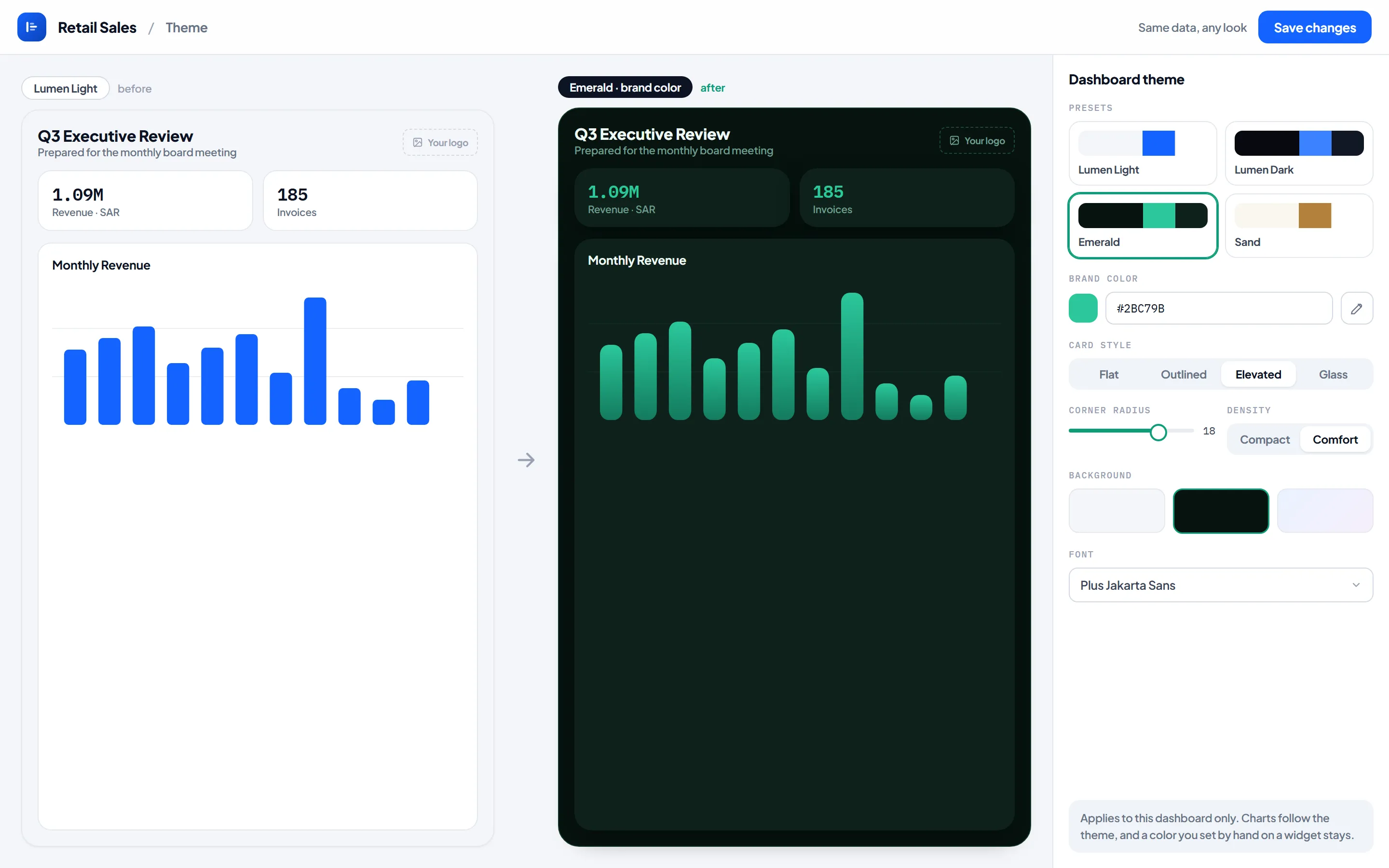
Every dashboard carries its own theme. Start from one of six presets (Lumen Light,
Lumen Dark, Emerald, Midnight, Sand and Paper), then set your brand color, card
style, corner radius, density, background and font. Charts recolor with the theme,
and a color you set by hand on a widget stays put. Two dashboards on the same site
can look nothing alike.
Ask the copilot
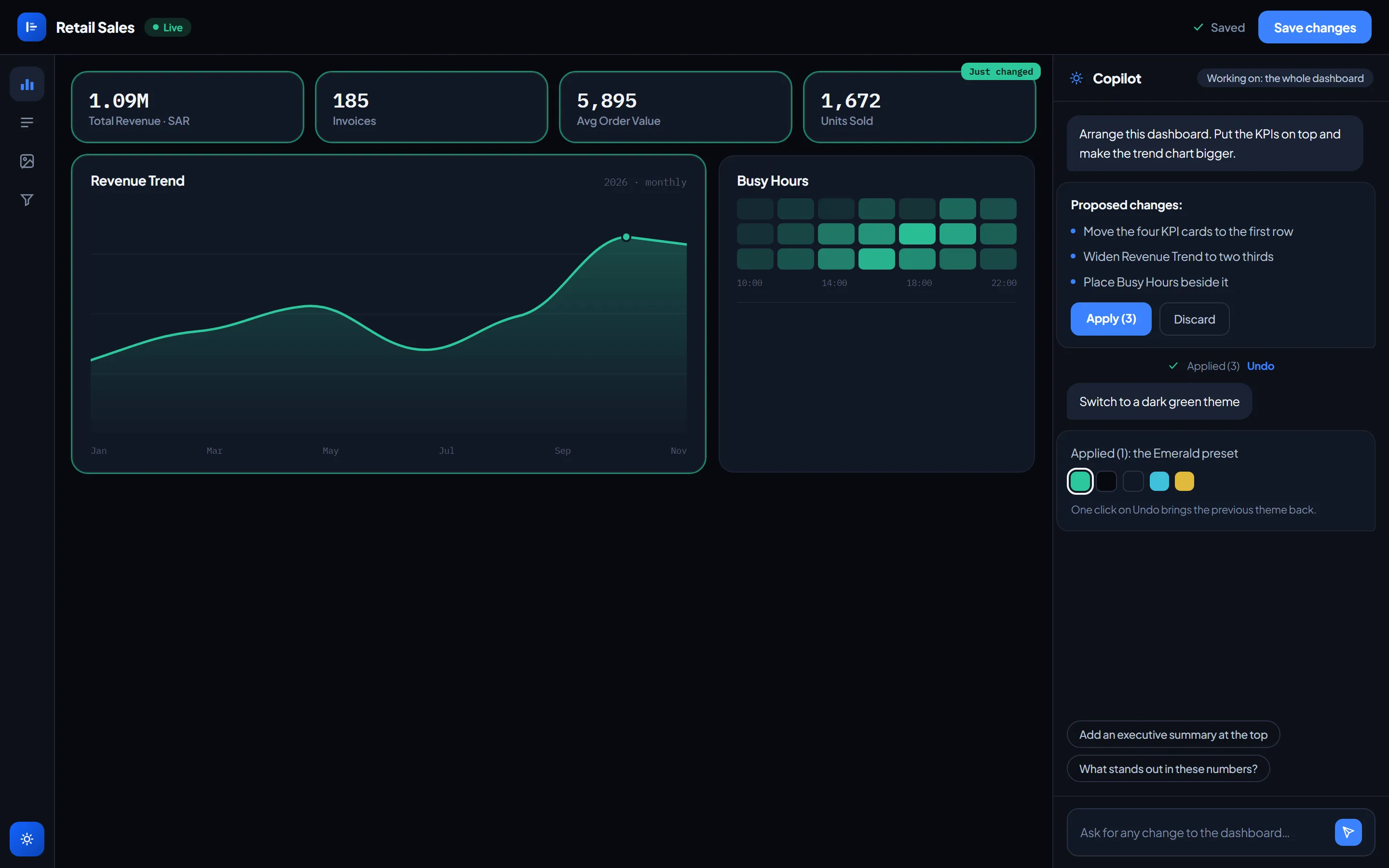
A copilot sits beside the canvas and changes the whole dashboard on request:
"Arrange this dashboard", "Switch to a dark theme", "Add an executive summary at the
top", "What stands out in these numbers?"
It can rearrange the layout, apply a theme, rename widgets, switch chart types, add
headings and notes, build new charts from your data, change what a widget measures,
and write a summary from the numbers on the board. You see the list of changes before
anything is applied, and one Undo takes the whole set back.
Or just ask
Describe a report in plain English and Lumen builds it:
"Show me revenue by brand, the busiest hours, and my top customers this year."
It picks the doctypes, writes the query, runs it against your real data and returns
working widgets with a short written analysis. Save them as a new dashboard or add
them to an existing one.
It asks before it assumes. A vague request gets one clear question with real
options from your data, never a wrong chart. When it does make a judgement call it
tells you, and offers each assumption as a one-tap refinement: "Limit this to 2026
only?", "Should returns be excluded?"
It speaks your business language. It reads your custom fields and child tables,
so "sales man" finds the Sales Person on your Sales Team table and "branch" finds
your POS Profile. When it maps an ambiguous word, it says so.
The AI features run on your own Google Gemini API key, set once in settings,
either site-wide or per user. Usage, and any charge for it, sits with the Google
account that owns the key. Without a key, everything else works and the AI features ask you to connect one.
Reports on paper and in the inbox
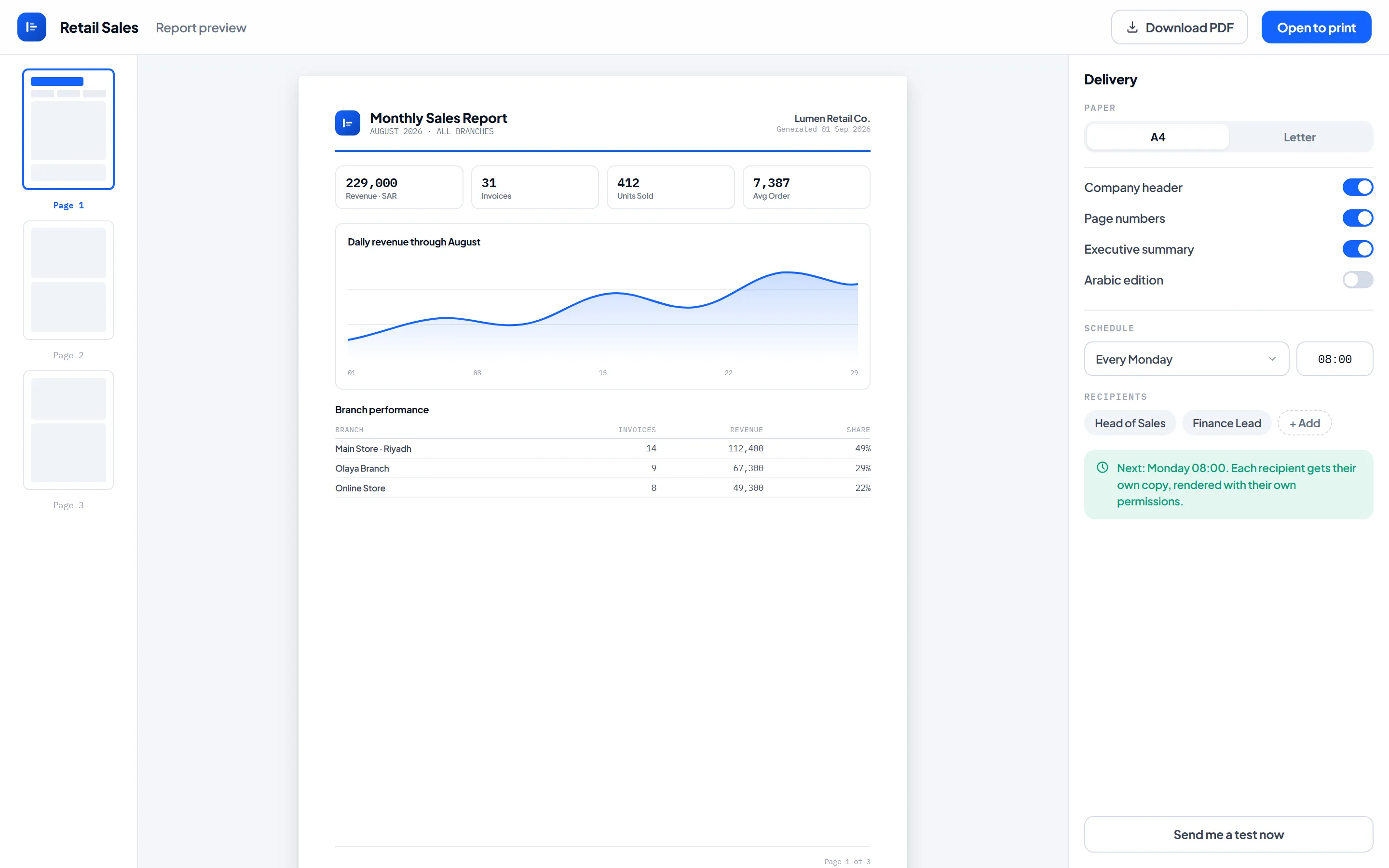
Any dashboard becomes a printable PDF: A4 or Letter, a company header, page numbers,
the filters you had applied, and an optional executive summary. Choose an English or
an Arabic edition. Dark dashboards print on white.
Schedule it daily, weekly or monthly and Lumen emails the PDF to the people you
choose. Each recipient gets their own copy, rendered with their own permissions, so
a regional manager receives their region. Someone who cannot open the dashboard
receives nothing. Delivery uses your site's own outgoing email account.
Arabic from the ground up
Switch the interface to Arabic with one click. Menus, the studio, the copilot, PDF
reports and scheduled emails all follow, laid out right to left, with Arabic month
and day names. The copilot answers in Arabic when you write to it in Arabic, and
templates created in Arabic get Arabic titles.
It stays live
When someone submits an invoice, every widget that depends on it refreshes. No
reload, no stale numbers on the wall-mounted screen.
Click a chart, focus everything
Click a brand and the whole dashboard refocuses on it, including KPI cards and
widgets built on invoice lines. Filters stack, so Paid and Riyadh and Electronics
combine into one coherent view, each with a removable chip.
Dashboard filters cover date ranges, searchable link fields, selects, checkboxes and
line items, not just document headers.
Report on data that is not on the document
Ask for revenue by brand and Lumen reports from the invoice lines while pulling the
brand from the item master. You get the item's current brand, not a stale snapshot
copied onto the line years ago.
Computed metrics go further, calculating values that exist in no field at all:
average check-in time, hours worked, payment terms in days, outstanding as a
percentage of invoiced.
Nobody sees more than their role allows
Lumen never runs raw SQL, not from the browser and not from the AI. Every widget
stores a query definition that the server validates and compiles through Frappe's
own permission layer, checking read access on the base doctype and on every table it
joins. The same check applies to PDF reports and to every scheduled email.
Two people can open the same dashboard and correctly see different numbers.
When you use an AI feature, Google receives the structure of the relevant doctypes
and summary figures, such as totals by category. It never receives whole documents
or table rows.
Also included
CSV export for any widget, including heatmap grids and tree breakdowns
SVG export for any chart
Publish to your team, keep a private draft, or show a dashboard only to named
roles and peopleResult caching with automatic invalidation when relevant data changes
Works on phones, not just desktops
Requirements
Frappe Framework v15 or v16
ERPNext is optional. Lumen reads whatever doctypes your site already has. Four of
the five templates use ERPNext data.The AI features are optional and use your own Google Gemini API key
Scheduled email delivery needs an outgoing email account on your site
User Reviews
No reviews yet, be the first to review.
0.0
0 rating
More apps from



Explore more apps