Frappe
Cloud
Marketplace
Frappe
Products
Insights
Publisher
Supported versions
Categories
E-Commerce
About
Lumen Restaurants
The restaurant till for ERPNext, built on the full LumenPOS point of sale.
Lumen Restaurants runs the floor, the counter and the kitchen of a restaurant on top of ERPNext. Waiters open tables and send each round to the kitchen, the kitchen works from a screen, takeaway customers get a short number to listen for, and guests book a table on a page the restaurant designs itself. Every sale is a real ERPNext POS Invoice, so stock, VAT and the ledger are exactly where your accountant expects them.
It is one app and one install, and it does not need LumenPOS: everything LumenPOS does is already inside. Each outlet chooses. Tick Run this outlet as a restaurant on a POS Profile and that outlet opens the restaurant till. Every other outlet stays a shop till, so a group with shops and restaurants runs one system.
The floor, drawn as it really is
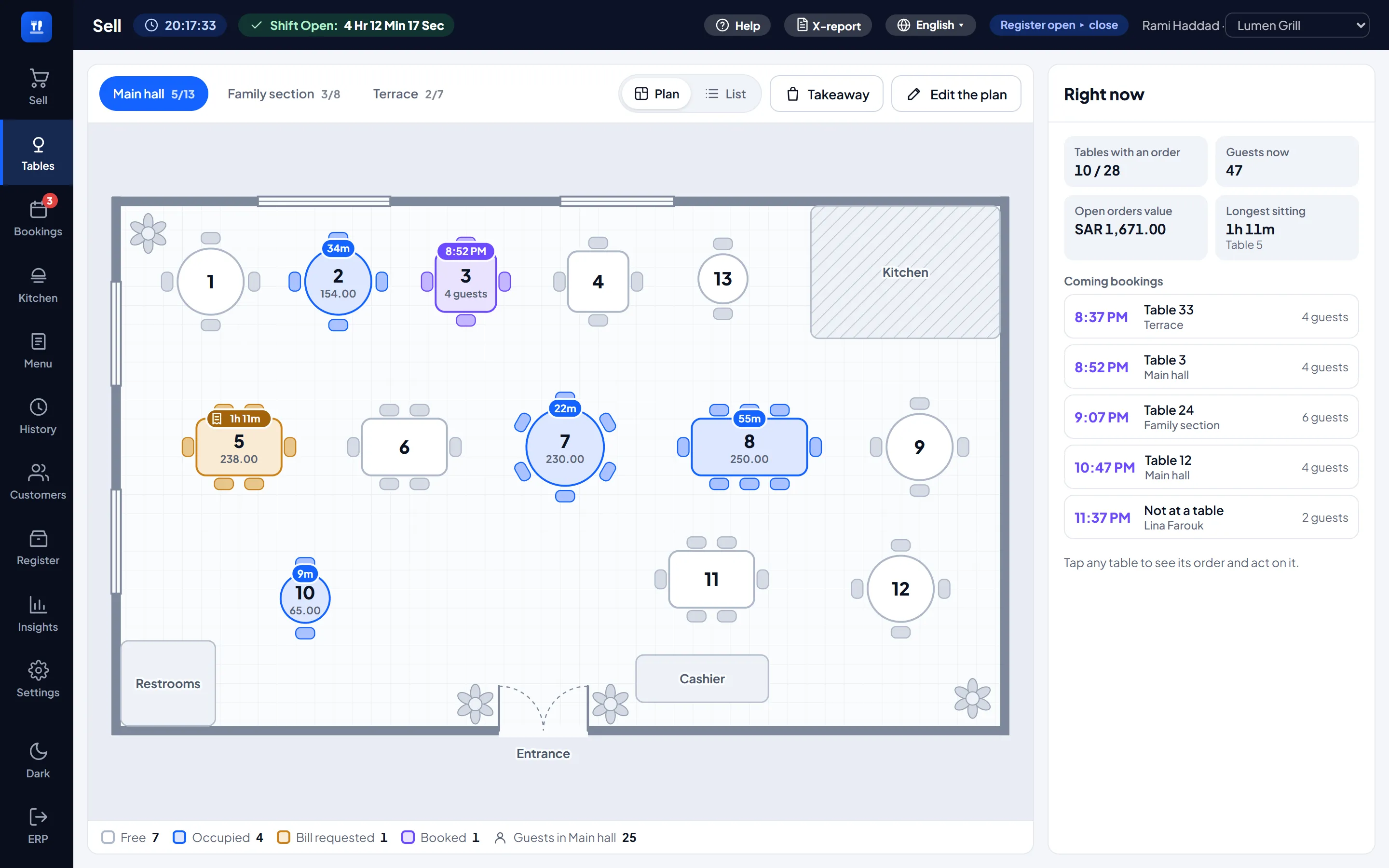
The Tables screen draws each area as a plan: the hall, the family section, the terrace, each with its tables in their places, shapes and chairs, among the walls, doors and windows. The colour of a table says what is happening there: free, occupied, waiting to pay, or booked.
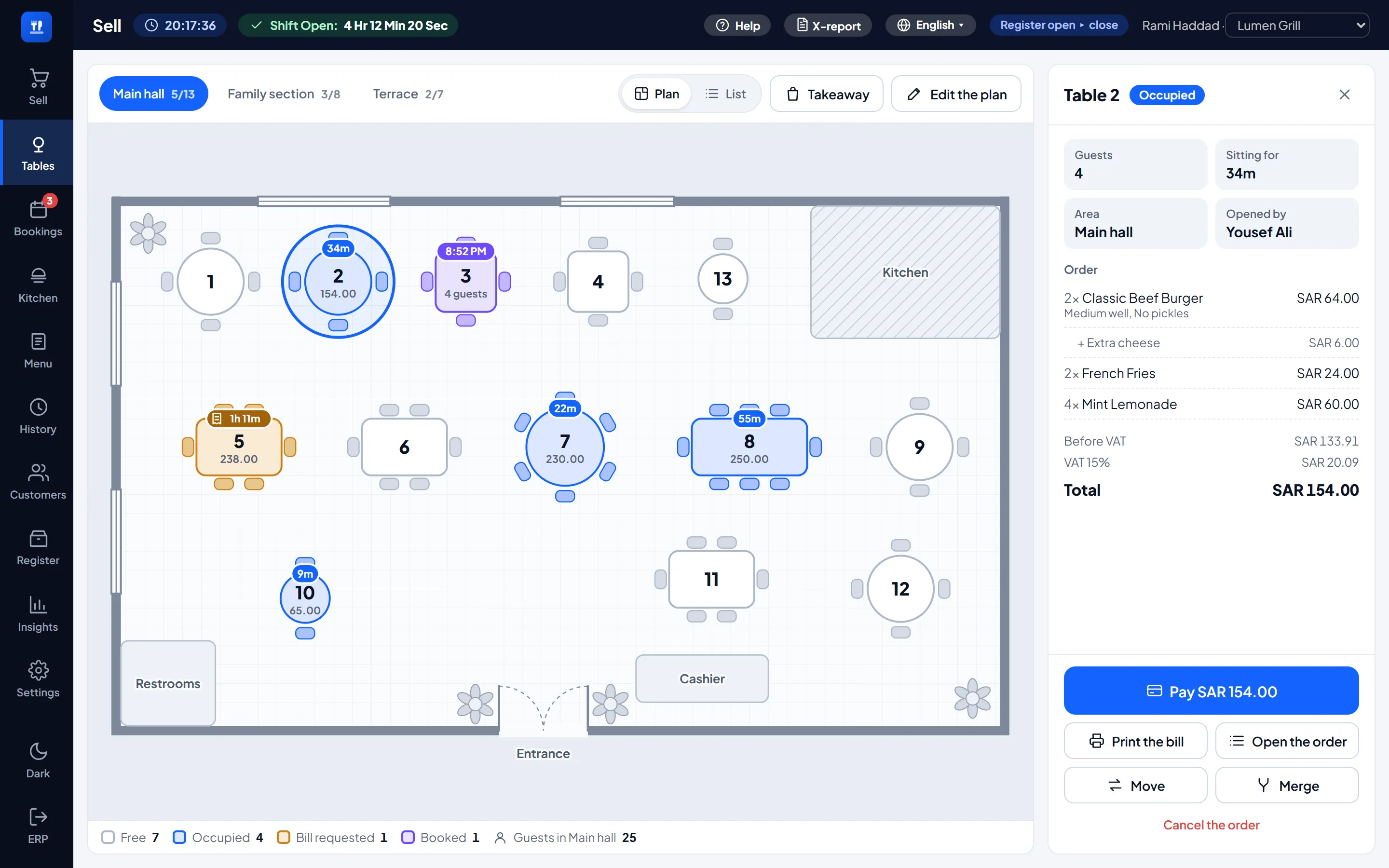
Tap a table and its panel shows the order priced exactly as it will be paid. Pay opens the till's own payment window, Print the bill prints what the table owes (marked as not a tax invoice), and Move or Merge finishes with one tap on the other table. Right now, beside the plan, sums up the floor: the busy tables, the guests, the value of the open orders, the longest sitting and today's coming bookings.
Managers draw the plan themselves: drag tables, change their shape, seats and number, add walls, doors, plants and the places guests look for, put a photo of the real floor underneath, and add areas. On a phone the same screen opens as a list.
Orders that stay open
A table order stays open while the guests eat. Send each round to the kitchen, add dishes as they come, move the table or merge two, and pay one ordinary sale at the end: cash, card, several tenders together, gift cards, store credit or the customer's account.
Takeaway and delivery are paid first and get a short daily order number, printed big on the receipt and carried by the kitchen ticket, so the counter can call it. A shift that sells past midnight keeps counting until it closes.
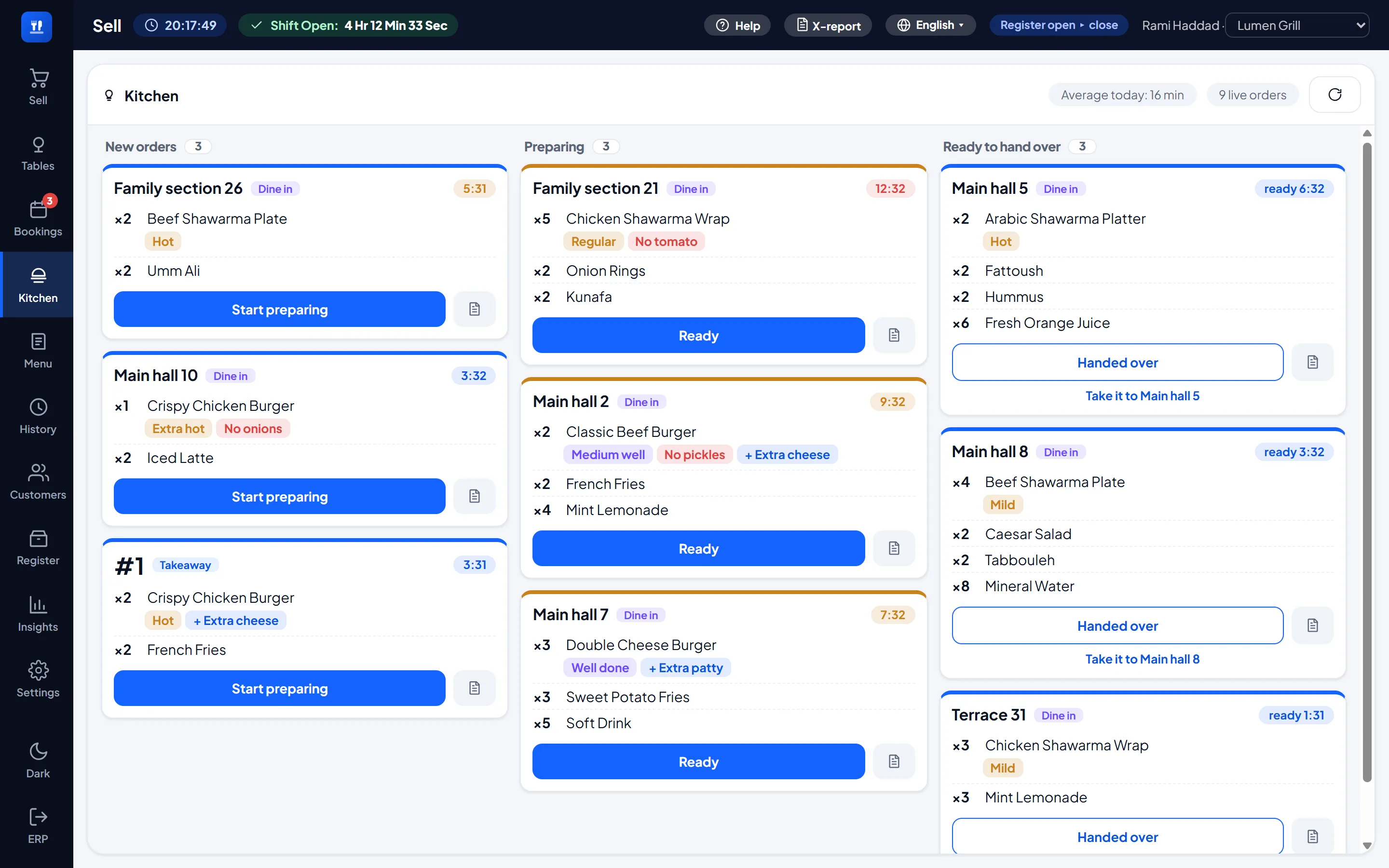
The kitchen screen
Three columns (new, preparing, ready), the guests' notes highlighted, and a clock that turns amber, then red, while a ticket waits. Every step is stamped, so the average preparation time in the header is real. A network kitchen printer per outlet is optional.
Add-ons on dishes
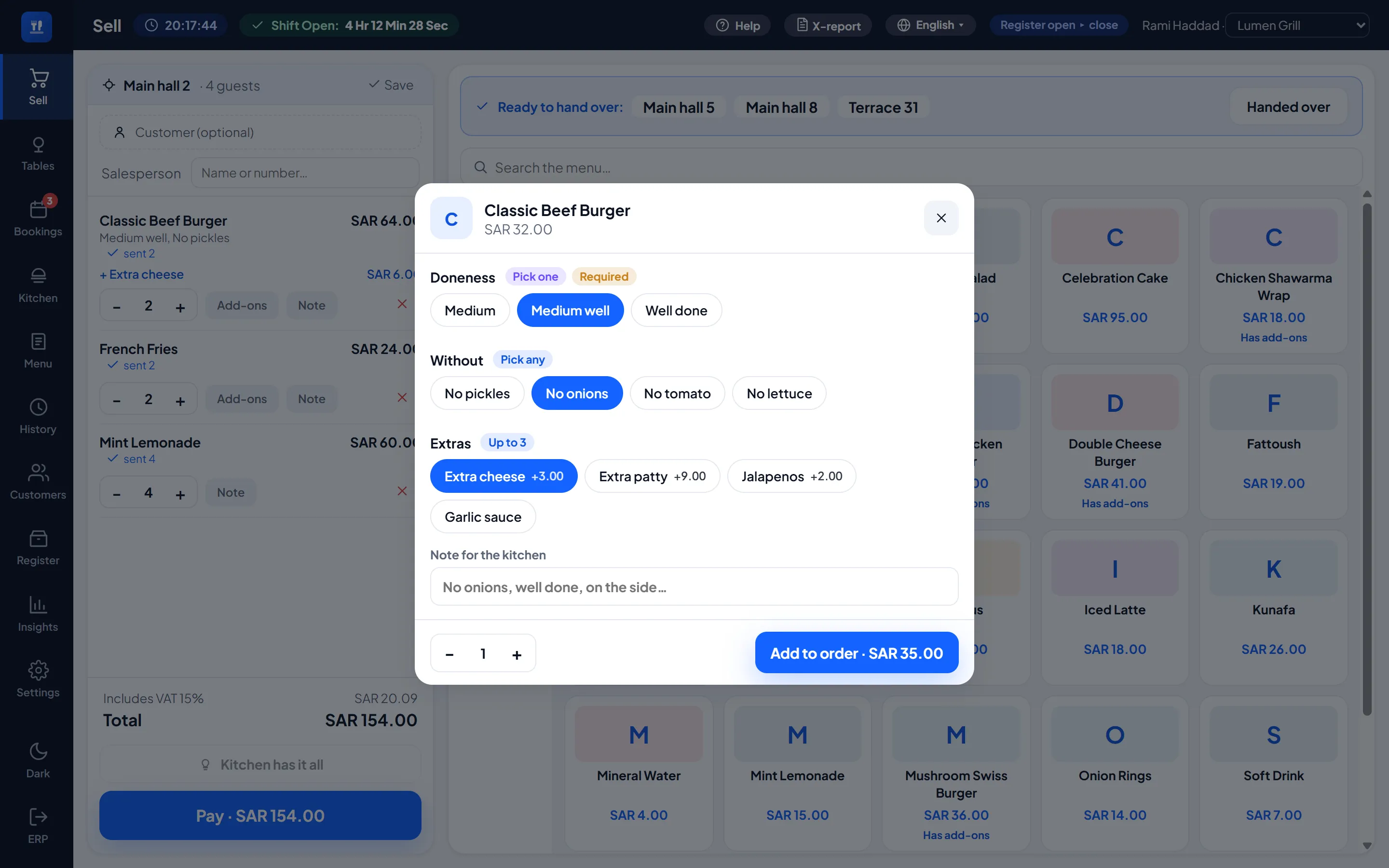
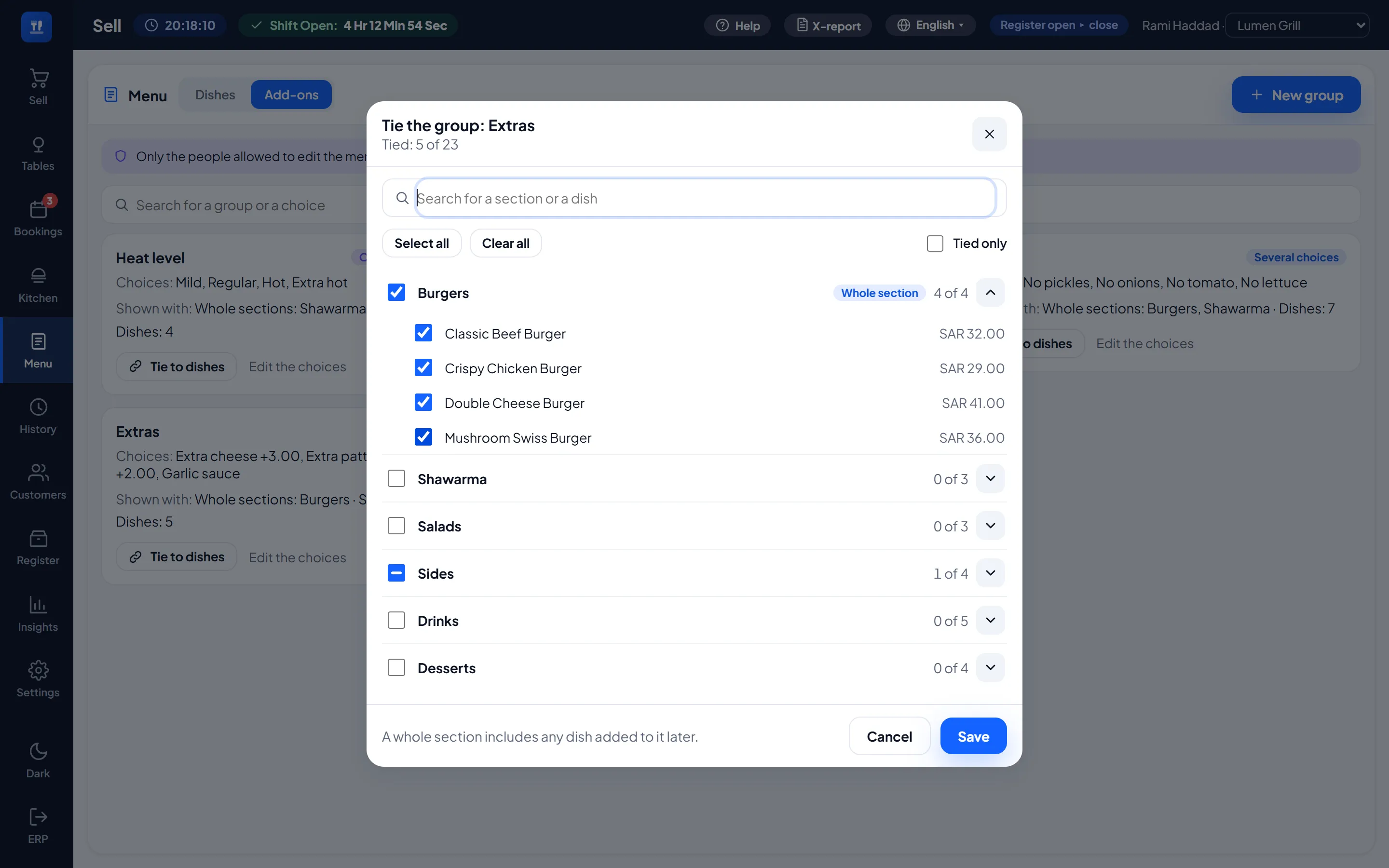
Without pickles, medium heat, extra mayo. On the Menu page you set up add-on groups (one choice or several, required or not, with a limit and a default) and tie them to whole sections or to single dishes, with a search that copes with a menu of any size. A free choice is an instruction for the kitchen. A paid one is billed on its own line under the dish, so VAT and the reports count it like any other item. The kitchen sees the choices in colour: without in red, heat in amber, doneness in violet.
The Menu page also adds dishes and changes their prices without opening ERPNext's own screens, and only the people you allow can open it.
Bookings, and a booking page you design
The Bookings screen is the day book: the time, the name and phone, the party, an optional table, and arrived, no show or cancel. A booked table shows on the floor before its time, and Seated opens its order.
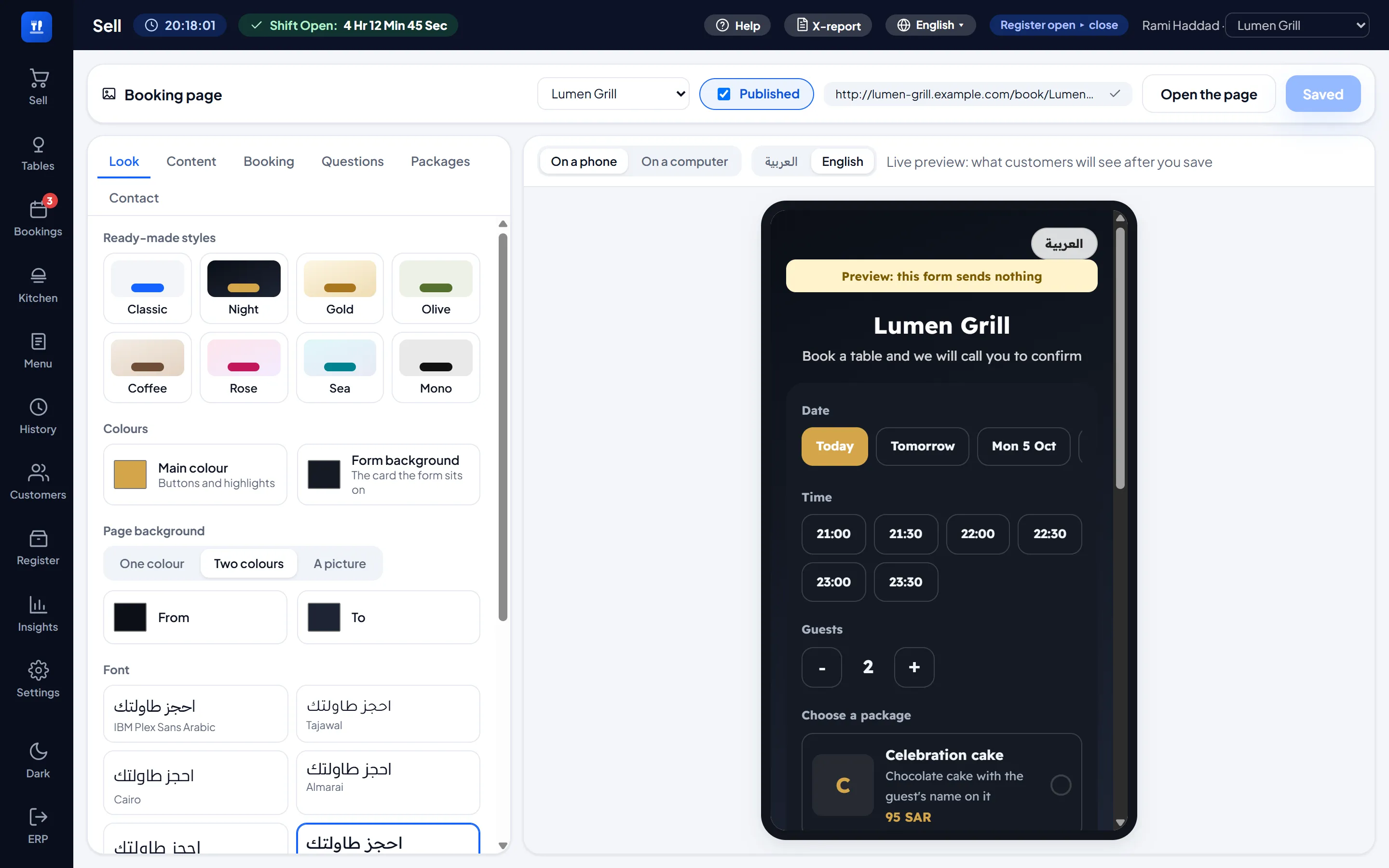
Each outlet gets a public booking page to share on social media. Design it with a live preview: colours, backgrounds, twelve Arabic fonts, your logo and a cover photo, your own questions, opening hours and closed days, how many guests one time slot can take, and packages such as a buffet priced per guest. Bookings arrive as requests to confirm, or confirmed at once if you prefer.
Everything LumenPOS does
Shifts and a register that balances (a blind count, X and Z reports), returns and refunds, customers, promotions and bundles for combo meals, price lists, loyalty points, gift cards, cashback, approvals with an audit log, an Insights sales dashboard, sales in other currencies, and groups of several companies.
Your team, your rules
Every feature has its own switch. Rights such as editing the menu, editing the floor plan and selling on account stay with managers until you name a role or a person, and the server checks every right again on every call.
English and Arabic
Every restaurant screen, the receipts and the booking page work in English and Arabic, with real right to left, in light and dark.
What you need
Frappe / ERPNext v13 to v16
A POS Profile per outlet (company, price list, warehouse, payment methods) with your staff added, and Run this outlet as a restaurant ticked
The front end ships built, so there is no Node or build step. A site runs Lumen Restaurants or LumenPOS, not both, because they keep the same records.
Actively developed
Lumen Restaurants is developed alongside LumenPOS and takes in every LumenPOS release. Next on the list: splitting a bill by item or evenly.
Built by Lumen Solutions · [email protected]
User Reviews
No reviews yet, be the first to review.
0.0
0 rating
More apps from



Explore more apps